
Having a website is now a basic requirement for businesses, freelancers, and professionals who want to establish credibility online.
In Singapore, potential customers commonly search online before deciding which company to contact, whether they are looking for tuition services, renovation contractors, fitness coaches, consultants, or e-commerce stores.
A website allows businesses to present their services clearly, demonstrate credibility, and provide a central location where customers can learn more before making enquiries.
The old assumption:
Many people assume that building a website requires technical skills such as programming or coding knowledge. Terms such as HTML, CSS, hosting configuration, and domain setup can make the process appear complex, particularly for beginners who have never created a website before.
Historically, websites required manual coding, which meant that most businesses needed to hire developers or agencies to build even simple websites.
The reality today:
Website creation is significantly more accessible. Modern tools allow users to design pages visually, while AI-assisted builders can generate layouts and draft content automatically.
Where WordPress fits in:
Among the available platforms, WordPress remains one of the most widely used solutions because it offers flexibility, scalability, and control without requiring programming knowledge.
What this article covers:
- What WordPress is and how it works as a website builder
- How beginners can create a WordPress website without coding
- How AI tools have simplified website planning and design for small business owners and entrepreneurs to launch websites more efficiently
Before diving into how WordPress works, let’s first understand what WordPress is and why it matters.
What is WordPress?
WordPress is a content management system (CMS). A CMS is software that allows users to create and manage website content using a visual interface instead of writing code manually.
Rather than building webpages line by line using programming languages, you work through a dashboard where you can create pages, upload images, edit text, and customise layouts.
To understand why this is important, it helps to briefly look at how websites were traditionally built. In the past, developers created websites using HTML to structure content and CSS to control visual appearance.
- HTML defines elements such as headings, paragraphs, links, and images
- CSS determines colours, fonts, spacing, and page layout
Every webpage needed to be manually written and tested across different devices, which made website development time-consuming and technically demanding.
WordPress removes this complexity by automatically generating the underlying code. You can focus on content and layout, while the platform handles technical implementation in the background.
This makes WordPress particularly suitable for business owners, freelancers, and marketers who want to manage their own websites without depending entirely on developers.
If you want to build a website with WordPress but have no technical background, this is WordPress for beginners made simple. WordPress CMS explained clearly means you control the content, and WordPress handles the code.
Key facts about WordPress:
- Powers more than 40% of all websites globally, making it one of the most widely used, and often the most popular, website platforms in the world
- Ranges from personal blogs to corporate websites, ecommerce stores, and online learning platforms
- Its widespread adoption also means strong community support, long-term stability, and continuous development
Now that you know what WordPress is, let's explore why it has become one of the most popular website builders in the world.
Why WordPress Is One of the Most Popular Website Builders
WordPress has remained popular because it balances ease of use with flexibility. Beginners can start with simple templates and visual editors, while more advanced users can customise
Key Advantages of WordPress
- Ownership and control
- You retain full access to your website files and content, so you can migrate, modify, or expand without being locked into a proprietary platform.
- This is especially important for companies that expect their digital presence to grow over time.
- Large ecosystem of themes and plugins
- Themes control visual design, while plugins add functionality like e-commerce, contact forms, analytics, booking systems, and SEO tools
- Affordability
- For Singapore SMEs, WordPress offers a practical balance between cost and long-term flexibility
Because this ecosystem is so extensive, you can customise your website completely, without building any features from scratch.
But can you really build a website using WordPress without any coding knowledge? Let's answer that question directly.
Can You Build a Website Without Coding Using WordPress?
Yes – modern WordPress websites can be created without writing HTML or CSS. Visual editors allow users to design pages by arranging content blocks, similar to editing a document or presentation slide.
Quick refresher on coding languages:
- HTML (HyperText Markup Language) determines the structure of a webpage. It defines where headings, paragraphs, buttons, and images appear.
- CSS (Cascading Style Sheets) controls how these elements appear visually, including colours, fonts, spacing, and responsive behaviour across different devices.
In the past, developers needed to manually write HTML and CSS to build each page. Today, WordPress automatically generates this code based on the layout created using visual editors.
Popular visual builders include:
- Gutenberg (built into WordPress)
- Elementor
- Divi
- Beaver Builder
These tools allow you to drag and arrange headings, images, testimonials, and buttons directly on the page.
That means a WordPress website without coding is not only possible but also practical for small business owners. Because the platform handles the technical implementation automatically, you can focus on structuring content clearly and presenting information effectively.
Before you start building, however, you need a plan. Let's look at how to plan your WordPress website properly.
Planning a WordPress Website Before You Build
Although WordPress and AI tools make website creation more accessible, effective websites still begin with a simple plan. Planning ensures that the website communicates clearly and meets the needs of visitors.
Most SME websites aim to answer four key questions:
- What does the business offer?
- Who is the service intended for?
- Why is the business credible?
- How can visitors make contact?
Structuring your website around these questions improves clarity and encourages enquiries.
How AI tools help with planning:
AI tools can also simplify the planning stage by generating suggested page structures based on a short description of the business. Instead of starting with a blank page, business owners can describe their services and allow AI tools to generate an initial website structure.
For example, a Singapore interior design firm specialising in modern HDB renovation projects could enter a short description explaining its services and target audience. AI tools such as WordPress AI Website Builder, Elementor AI features, the AI Builder plugin, or ZipWP can generate a draft layout.
A typical AI-generated structure might include:
- A homepage introducing the design style
- A services page describing renovation packages
- An about page explaining credentials and experience
- A portfolio section showing completed projects
A contact page allowing visitors to request consultations
AI tools can also generate draft headings, service descriptions, and frequently asked questions. These drafts are not final versions, but they provide a starting point that reduces the effort required to organise the website logically.
AI, therefore, acts as a planning assistant, helping translate business ideas into structured website layouts.
Once you have a plan, you need a domain name and hosting. Let’s walk through that setup process.
Domain and Hosting Setup for a WordPress Website
Before launching a WordPress website, you need two essential components: a domain name and web hosting.
What Is A Domain Name?
- The address that users type into their browser (e.g., yourcompany.com or yourcompany.sg)
- You can purchase domains through providers such as Namecheap, GoDaddy, or Vodien
- For Singapore-based businesses, .sg domains are often preferred because they signal local presence
What Is Web Hosting?
- Stores your website files on servers so that your website can be accessed online
- Popular hosting providers include Hostinger, SiteGround, Exabytes, and Vodien
Simple Setup Process
- Purchase your domain name
- Sign up for a hosting plan
- Use one-click WordPress installation (offered by most hosting providers)
- Log into your WordPress dashboard
A proper WordPress website setup starts with choosing reliable hosting and a memorable domain name. Once installed, you can log in to the WordPress dashboard and begin creating pages.
After setting up hosting, you'll need to navigate your new WordPress dashboard. Let's take a tour.
Navigating the WordPress Dashboard
The WordPress dashboard functions as the control centre of your website. It allows you to create pages, publish blog posts, upload images, install plugins, and customise website settings.
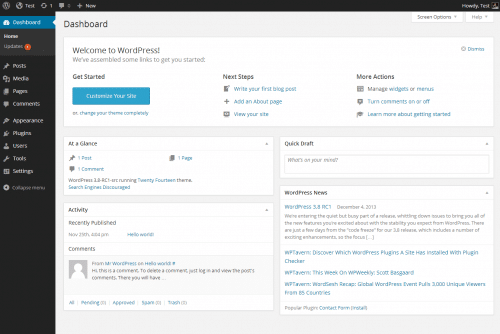
What you can do from the dashboard:
- Create pages: Use an editor similar to a document editor, inserting headings, paragraphs, and images
- Manage media: Upload files into a central library and reuse them across different pages
- Install plugins: Add functionality with one click
- Customise appearance: Change themes, colours, and layouts
Once you understand how to create a WordPress website, the dashboard becomes your everyday tool for updates and growth. Because most website updates can be completed through the dashboard, ongoing maintenance becomes manageable even for beginners.
With the dashboard mastered, you'll want to make your website look great. That's where themes and plugins come in.
Customising Your Website with Themes and Plugins
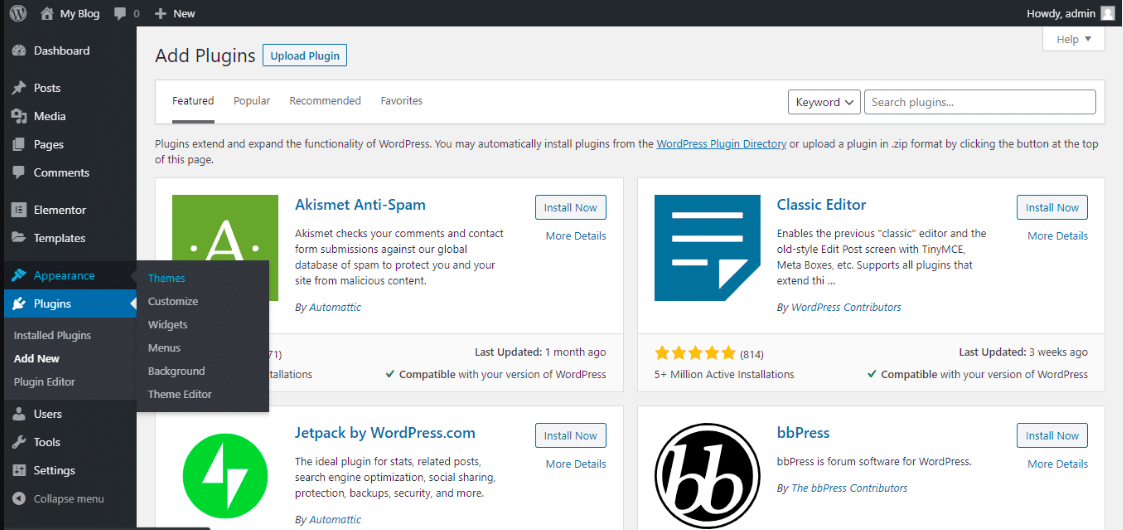
Themes and plugins are the building blocks of any WordPress website. They allow you to customise without writing a single line of code.
Themes control the visual appearance of your website. They determine:
- Layout structure
- Typography
- Colours
- Spacing
Plugins extend the functionality of your website. While AI builders help generate page layouts and content, plugins provide practical capabilities required for business operations.
Essential plugin examples:
- Yoast SEO: Optimises page titles and descriptions for search engines
- WPForms: Enables enquiry forms for visitor contact
- WooCommerce: Adds e-commerce functionality to sell products online
- Wordfence: Improves website security
You install plugins with one click. Plugins, therefore, function as modular extensions layered on top of your AI-generated design. AI helps create the structure of your website, while plugins enable marketing, analytics, e-commerce, and operational capabilities.
A good-looking website is just the start. Next, let's connect it to digital marketing tools so it actively works for your business.
Integrating Digital Marketing Tools into WordPress
WordPress integrates easily with digital marketing tools that help businesses attract visitors and generate leads.
Common marketing integrations:
- Search engine optimisation (SEO) tools: Improve search visibility
- Email marketing integrations: Collect subscriber information and send campaigns
- Analytics tools: Measure visitor behaviour and conversion rates
- Social sharing features: Distribute content across Facebook, LinkedIn, and other platforms
For SMEs, this transforms the website from a static information page into an active marketing channel.
Speaking of SEO, let’s dive deeper into how WordPress helps your website get found on Google.
SEO for WordPress Websites
Search engine optimisation helps your website appear in search results when users look for relevant products or services.
How WordPress supports SEO:
- Structured page layouts that search engines understand
- Editable page titles and meta descriptions
- Clean, semantic code
- Custom metadata fields for each page
Basic SEO practices you can implement:
- Optimise page titles with relevant keywords
- Use headings (H1, H2, H3) to structure content
- Write descriptive alt text for images
- Install an SEO plugin like Yoast SEO for guidance
For example, a tuition centre may optimise pages for keywords such as PSLE tuition Singapore or maths tuition Jurong.
Publishing relevant content consistently can improve visibility and attract organic traffic over time.
After optimising for SEO, you're almost ready to launch. Here's what you need to know about going live and maintaining your site.
Launching and Maintaining a WordPress Website
Before launching your website, you should perform a few final checks.
Pre-Launch Checklist
- Review formatting across all pages
- Test mobile responsiveness (how the site looks on phones and tablets)
- Ensure all links function correctly
- Check page load speed
- Verify contact forms work
- Once you connect the domain, your website becomes publicly accessible.
Ongoing Maintenance Tasks
- Update plugins regularly
- Back up website data (many hosting providers offer automatic backups)
- Monitor website performance
- Check for security issues
Because WordPress allows updates through the dashboard, you can complete most maintenance tasks without technical assistance.
You don't need a perfect website at launch. Improvements can be made continuously as content evolves and customer feedback is gathered.
If you want to truly master WordPress, learning proper website creation skills makes all the difference.
Learning WordPress Website Creation Skills
While AI tools and drag-and-drop builders lower the barrier, learning WordPress website creation skills properly helps you avoid common mistakes.
Common mistakes beginners make without proper training:
- Poor website structure that confuses visitors
- Slow performance from un-optimised images or too many plugins
- Weak SEO prevents Google from finding the site
- Security vulnerabilities from outdated themes or plugins
Benefits Of Structured Training
- Learn to plan, build, and maintain a website with confidence
- Avoid guesswork with plugins and SEO settings
- Build real projects that mirror real business needs
- Troubleshoot issues without relying on developers
WordPress skills are valuable for anyone interested in digital marketing, website management, or entrepreneurship. Practical learning through real projects helps you build confidence in creating and managing websites.
How does WordPress compare to other AI website builders? Let's look at the trade-offs.
Comparing WordPress AI Builders with Other AI Website Platforms
AI website builders such as Wix AI, Squarespace AI tools, and Shopify AI store builders have simplified website creation significantly.
Important consideration:
The easier it is to generate a design, the harder it may be to customise the design later.
How WordPress Differs
- Flexibility
- WordPress: High (change themes and plugins anytime)
- Other AI Builders: Limited (may be stuck with chosen template)
- Customisation
- WordPress: Full control over code and design
- Other AI Builders: Restricted to platform rules
- Migration
- WordPress: Easy to move to another host
- Other AI Builders: Difficult or impossible to export
- Long-term growth
- WordPress: Scales with your business
- Other AI Builders: Businesses may outgrow the flexibility
WordPress provides greater flexibility because themes and plugins can be changed over time. You are not restricted to a fixed design system and can adapt the website as your requirements evolve.
Let's talk about cost. How does building with WordPress compare to hiring a developer?
Cost Breakdown: WordPress vs Hiring a Developer
Typical cost components for building a WordPress website include domain registration, hosting, themes, plugins, and optional AI tools.
Estimated Costs (SGD)
- Domain name: $15 to $50 per year
- Hosting: $60 to $150 per year
- Premium theme: $60 to $120 one-time
- Plugins: $0 to $200 per year
- AI builder tools: $0 to $200 per year
Total DIY WordPress cost: Approximately $135 to $700 for the first year.
Hiring a web developer in Singapore typically costs between $800 and $5000, depending on complexity.
AI tools reduce initial development costs by generating layouts and draft content automatically, allowing businesses to launch websites more affordably.
Ready to start? Here’s a simple roadmap to follow.
Building Your Website: Start Simple and Improve Over Time
WordPress, combined with AI tools, makes website creation significantly more accessible than in the past. You can move from an idea to a functioning website within a relatively short period of time.
A Practical Step-By-Step Approach
- Define the purpose: What do you want your website to achieve?
- Register a domain name: Choose something memorable and relevant
- Choose a hosting provider: Look for a one-click WordPress installation
- Install WordPress: Usually automatic with hosting
- Use AI tools to generate an initial layout: Describe your business and let AI help
- Refine pages gradually: Add content, images, and details over time
Improvements can be made continuously as content evolves and customer feedback is gathered.
Starting the website is often the most important step. Once you have that foundation in place, your website can grow alongside your business.
Let's wrap everything up.
Wrapping Up
WordPress remains one of the most accessible tools to build a website, even if you have zero coding experience. It gives you control, flexibility, and room to grow.
Key takeaways:
- WordPress is a content management system (CMS) that automatically generates code for you
- You can build a WordPress website without coding using visual builders and AI tools
- A proper WordPress website setup starts with a domain, hosting, and a simple plan
- Themes control design, plugins add functionality
- SEO and digital marketing tools help your website get found
Whether you want to launch a business site, manage a blog, or add digital marketing skills to your toolkit, learning WordPress for beginners is a practical first step.
You don't need to master everything at once. Start with the basics: a domain, hosting, a simple layout, and one page of clear content. From there, improve over time.
If you prefer guided learning over trial and error, structured training helps you move faster with fewer frustrations. Either way, the best time to start your WordPress website setup is now.
Ready to Build Your WordPress Website with Expert Guidance?
You've seen how WordPress gives you the power to create a professional website without coding. But learning by yourself can still feel overwhelming.
Get structured, hands-on training with @ASK Training's Website Creation Bundle Courses.
Instead of figuring out plugins, SEO, and copywriting through trial and error, learn directly from industry veterans in immersive, practical sessions.
Choose your learning path:
- WordPress Website Creation (3 days): Master domain hosting, WordPress setup, SEO, and digital marketing integration. Build a complete website for personal or business use.
- Copywriting & Content Writing (3 days): Learn to craft compelling, SEO-friendly content that resonates with your audience and drives action.
- Website & Landing Page Conversion Optimisation (3 days): Apply consumer psychology and CRO (Conversion Rate Optimisation) strategies to improve user engagement and boost conversions.
Speak to our course consultant and take the next step today!
Related Courses
- (24hrs) WordPress Website Creation
- (24hrs) Copywriting and Content Writing
- (24hrs) Website and Landing Page Conversion Optimisation
◆◆◆
Related Articles
Article Topics
- What is WordPress?
- Why WordPress Is One of the Most Popular Website Builders
- Can You Build a Website Without Coding Using WordPress?
- Planning a WordPress Website Before You Build
- Domain and Hosting Setup for a WordPress Website
- Navigating the WordPress Dashboard
- Customising Your Website with Themes and Plugins
- Integrating Digital Marketing Tools into WordPress
- SEO for WordPress Websites
- Launching and Maintaining a WordPress Website
- Learning WordPress Website Creation Skills
- Comparing WordPress AI Builders with Other AI Website Platforms
- Cost Breakdown: WordPress vs Hiring a Developer
- Building Your Website: Start Simple and Improve Over Time
- Wrapping Up