
(SCTP) Advanced Certificate in IT Infrastructure and Operations (Eligible for Full-Time TA)
Dive into managing and optimising IT infrastructure across 14 modules and earn your Advanced Certificate.

*Eligible for Singaporean Citizens, Permanent Residents, and Long-Term Visit Pass Plus Holders
This programme is eligible for the $4,000 SkillsFuture Level-Up Programme top-up
*For SCTP Participants only
Our Clients


What is the SkillsFuture Career Transition Programme (SCTP)?
The SkillsFuture Career Transition Programme (SCTP) is a government initiative in Singapore designed to assist mid-career individuals in acquiring new skills and knowledge to facilitate a career transition. This programme is geared towards individuals who wish to switch industries or occupations due to changes in the job market, technological advancements, or personal career goals.
Here are some key features and components of the SkillsFuture Career Transition Programme:
Skills Upgrading: The SCTP provides funding and support for mid-career individuals to undergo training and upskilling in new areas, helping them acquire the skills and knowledge necessary for their chosen career transition.
Career Guidance: The programme also provides career advisory services and guidance to help individuals get placed in job roles, such as interview preparation, resume tips and more.
Need help? Contact us for more info
Advanced Certificate in IT Course Modules & Curriculum
The programme comprises 14 modules spanning 380 hours of training, structured across foundational,
intermediate, and advanced tiers.
Module 1: (8 hrs) Introduction to Information Technology (IT)
Learning Units
-
LU 1: Overview of the IT Industry in Singapore and Job Roles
- Industry trends
- Digital transformation
- IT job roles
- Required skills
-
LU 2: Basic Hardware Concepts
- Computer hardware components
- Computer system types
- Input devices
- Output devices
-
LU 3: Basic Software Concepts
- Software types
- Operating system overview
- File management
- Software licensing
-
LU 4: IT Overview / Glossary
- Essential IT terminologies
- Common IT acronyms
- Industry terminology
Course Objectives
By the end of this module, participants will be able to:
- Recognise the significance of Singapore’s IT industry and its influence across sectors.
- Identify emerging IT trends, technologies and the effects of digital transformation.
- Explore diverse IT roles such as help desk support, IT administrator and IT project manager.
- Distinguish CPU functions, differences between RAM and ROM, and comparisons between storage devices.
- Differentiate system software from application software and understand operating system roles and utility functions.
- Define key IT terms and interpret widely used IT acronyms.
Assessment
- Written Assessment: 1 hour
Module 2: (24 hrs) Understanding Computer Hardware & Peripherals
Learning Units
-
LU 1: Introduction to Computer Hardware
- Definition of computer hardware
- Significance of computer hardware
- Key hardware components
-
LU 2: Identifying the Parts and Connectivity
- Motherboard
- CPU
- RAM
- Storage devices
- Graphics cards
- Input and output devices
- Connectivity
-
LU 3: PC Build-Up / Upgrading
- PC building process
- Component compatibility
- Step-by-step assembly
- Troubleshooting build issues
-
LU 4: BIOS and Process Flow of Booting
- Introduction to BIOS
- Boot process
- BIOS configuration
- Boot-related troubleshooting
Course Objectives
By the end of this module, participants will be able to:
- Acquire a holistic understanding of computer hardware components and their roles in user-computer interaction.
- Identify and explain the primary functions of the motherboard, CPU, RAM, storage devices and data-transfer interfaces.
- Assemble and upgrade a PC, assess component compatibility and troubleshoot hardware build issues.
- Articulate the role of BIOS in the boot process and resolve boot-related errors.
Assessment
- Practical Assessment: 2 hours
Module 3: (24 hrs) Operating Systems and Desktop Support
Learning Units
-
LU 1: Introduction to Operating System
- Operating system roles
- Windows operating system overview
- Virtualised operating system overview
- Key operating system terminology
-
LU 2: Installation and Configuration of Windows OS
- Evolution of Windows
- Hardware requirements
- Installation on physical machines
- Installation on virtual machines
- User account management
- System updates
-
LU 3: Desktop Support Best Practices
- Role of a desktop support technician
- Remote support tools
- User issue management
-
LU 4: Virtualised Environment and Hands-on Activity
- Virtualisation concepts
- Setting up virtual environments using VMware
- Setting up virtual environments using VirtualBox
-
LU 5: Maintenance and Performance Optimisation
- System maintenance
- Disk management
- Performance monitoring
- Performance troubleshooting
-
LU 6: Security and Data Backup
- Security threats
- Firewall configuration
- Data backup strategies
- Data recovery strategies
Course Objectives
By the end of this module, participants will be able to:
- Understand the role of operating systems in managing computer resources across major platforms.
- Configure Windows OS across physical and virtual environments and manage user access securely.
- Build capabilities as a desktop support technician, including remote support and troubleshooting end-user issues.
- Understand virtualisation principles and establish virtualised environments using VMware and VirtualBox.
- Optimise system performance, manage disks and address performance-related issues.
- Identify and counteract common security threats and establish resilient data backup and recovery mechanisms.
Assessment
- Practical Assessment: 2 hours
Module 4: (24 hrs) Network Fundamentals and Troubleshooting
Learning Units
-
LU 1: Introduction to Computer Networks
- Network communication
- Network components
- Routing
- Network devices
- Network services
-
LU 2: Network Types, Topologies, Protocols, Methodologies
- Local Area Network (LAN)
- Wide Area Network (WAN)
- Metropolitan Area Network (MAN)
- Network topologies
- Network protocols
- OSI model
- TCP/IP model
-
LU 3: Setup and Configure Small-Scale Network, and Troubleshoot Connectivity Issues
- Small-scale network setup
- Network device configuration
- Connectivity troubleshooting
- Collaborative network design
-
LU 4: Network Simulation Software and Design
- Filius network simulation software
- Virtual network design
- Virtual network testing
Course Objectives
By the end of this module, participants will be able to:
- Acquire a comprehensive understanding of computer network essentials, including components, data transmission, routing and IP addressing.
- Understand diverse network classifications, topologies, protocols, and the OSI and TCP/IP models.
- Design, configure and manage a small-scale network and diagnose and resolve connectivity issues.
- Leverage network simulation software to design, test and troubleshoot virtual networks.
Assessment
- Written Assessment: 1 hour
- Practical Assessment: 1 hour
Module 5: (24 hrs) Cybersecurity Essentials
Learning Units
-
LU 1: Summarizing Fundamental Security Concepts
- Information security principles
- Security control types
- Cybersecurity roles and responsibilities
-
LU 2: Comparing Threat Types
- Threat actor types
- Threat actor attributes and motivations
- Common threat vectors
- Attack surfaces
- Threat mitigation strategies
-
LU 3: Explaining Appropriate Cryptographic Solutions
- Encryption
- Cryptographic algorithms
- Key exchange
- Public key infrastructure
- Digital certificates
-
LU 4: Implement Identity and Access Management
- Authentication and authorisation
- Account policies
- Password-based authentication
- Multifactor authentication
- Single sign-on
- Federated identity
-
LU 5: Maintain Enterprise Campus Network Architecture
- On-premises network security
- Secure remote access
- Secure communications
- Network tunnelling
-
LU 6: Secure Cloud Network Architecture
- Cloud infrastructure security
- Embedded system security
- Zero Trust architecture
-
LU 7: Explain Resiliency and Site Security Concepts
- Asset management practices
- Physical security controls
- Organisational resource protection
Course Objectives
By the end of this module, participants will be able to:
- Explain information security concepts, security control types, and key security roles and responsibilities.
- Analyse threat actor types, including their attributes and motivations, as well as common threat vectors and attack surfaces.
- Apply appropriate cryptographic solutions for encryption and key exchange using cryptographic algorithms, public key infrastructure and digital certificates.
- Apply authentication, account policy, authorisation and identity solutions, including password-based and multifactor authentication, single sign-on and federated identity.
- Apply security principles and controls to secure on-premises network architectures and ensure secure communications for remote access and tunnelling.
- Apply security principles to cloud infrastructure, embedded systems and Zero Trust architecture.
- Apply asset management practices and physical security controls to protect organisational resources.
Assessment
- Written Assessment: 2 hours
Module 6: (16 hrs) IT Troubleshooting and Problem Solving
Learning Units
-
LU 1: Introduction to Troubleshooting Process and Identifying Common IT Issues
- Troubleshooting principles
- Troubleshooting process
- Common IT issues
- Issue categorisation techniques
-
LU 2: Problem Analysis and Diagnosis
- Problem analysis
- Root-cause identification
- Data gathering
- Issue prioritisation
-
LU 3: Hardware and Software Troubleshooting
- Hardware problem resolution
- Software diagnostics
- Built-in diagnostic tools
-
LU 4: Network Troubleshooting
- Network components
- Connectivity diagnosis
- Slow network performance
- IP configuration issues
-
LU 5: Application Troubleshooting
- Application errors
- Compatibility issues
- Application performance problems
- Software updates
-
LU 6: Security Troubleshooting
- Security measures
- Security best practices
- Responding to security incidents
Course Objectives
By the end of this module, participants will be able to:
- Comprehend the fundamentals of troubleshooting and recognise common IT problems in the workplace.
- Analyse and diagnose IT problems effectively, prioritising tasks based on root causes.
- Resolve hardware and software-related issues using appropriate diagnostic tools and techniques.
- Demonstrate proficiency in diagnosing network connectivity problems and enhancing network performance.
- Resolve application-related errors and software installation issues.
- Identify, implement and respond to security-related concerns and incidents.
Assessment
- Written Assessment: 2 hours
Module 7: (24 hrs) IT Service Management and Help Desk Operations (ITIL 4 Foundation)
Learning Units
-
LU 1: Key Concepts of Service Management
- Value
- Stakeholders
- Service consumer roles
- Service offerings
- Co-creation of value
-
LU 2: Key Concepts of ITIL 4
- Four dimensions of service management
- Service value system
- Service value chain
-
LU 3: The Guiding Principles
- Introduction to the ITIL 4 guiding principles
- Application of the ITIL 4 guiding principles
-
LU 4: ITIL 4 Management Practices
- Purpose of ITIL practices
- Overview of eight ITIL practices
- Key management practices — Part 1
- Key management practices — Part 2
- Key management practices — Part 3
Course Objectives
By the end of this module, participants will be able to:
- Explain the fundamentals of service management, including value, stakeholders, service offerings and value co-creation.
- Describe the key concepts of ITIL 4, including the four dimensions, service value system and service value chain.
- Apply the ITIL 4 guiding principles to improve service delivery and organisational effectiveness.
- Identify the purpose and contribution of ITIL 4 management practices, including key practices in service management.
Assessment
- Written Assessment: 2 hours
Module 8: (32 hrs) Advanced Hardware and Software Troubleshooting
Learning Units
-
LU 1: Introduction to Advanced Troubleshooting
- Advanced hardware issues
- Advanced software issues
- Problem-solving methodology
- Common complex technical challenges
-
LU 2: Advanced Hardware Troubleshooting Techniques
- Hardware diagnostics
- Identifying complex hardware issues
- Resolving complex hardware issues
- Hands-on troubleshooting practice
-
LU 3: Advanced Software Troubleshooting Techniques
- Software debugging and analysis
- Conflict-resolution techniques
- Real-world troubleshooting scenarios
-
LU 4: Diagnosis and Resolution of Complex Technical Problems
- Advanced diagnostic skills
- Complex issue prioritisation
- Problem-solving methodologies
-
LU 5: Overview of IT Asset Management (ITAM)
- Introduction to IT Asset Management
- Asset classification
- Asset lifecycle management
- ITAM tools
- Real-world case studies
Course Objectives
By the end of this module, participants will be able to:
- Evaluate the significance of advanced troubleshooting techniques and methodologies for resolving complex hardware and software challenges.
- Explain the functions of key computer hardware components, including the motherboard, CPU, RAM, storage and I/O devices.
- Utilise software debugging and conflict-resolution techniques in real-world scenarios.
- Apply advanced diagnostic and prioritisation skills to efficiently resolve complex technical challenges.
- Explain the importance of IT Asset Management, including asset types, regulations, disposal practices and environmental sustainability.
- Apply ITAM principles in a hands-on workshop setting to manage, track and dispose of IT assets effectively.
Assessment
- Written Assessment: 1 hour
- Practical Assessment: 1 hour
Module 9: (48 hrs) Systems and Server Administration
Learning Units
-
LU 1: Introduction to Microsoft Server Environment
- Server concepts
- Server hardware
- Server roles
- Windows Server features
- Active Directory overview
- DNS overview
- DMZ overview
- Cloud overview
-
LU 2: Server Installation
- Server installation options
- Virtual servers
- Physical servers
- Windows Server 2022 installation
-
LU 3: Deployment of Active Directory Domain Service (ADDS)
- Active Directory structure
- Domain controllers
- Organisational Units (OUs)
- User management
- Group management
- Read-Only Domain Controllers (RODC)
-
LU 4: Deployment of DNS and DHCP
- DNS setup
- DNS zone configuration
- DNS forwarders
- DHCP configuration
- DHCP scopes
-
LU 5: Deployment of Disks, File System and Storage Space
- Disk types
- Volumes
- NTFS permissions
- Share permissions
- Storage replicas
-
LU 6: Deployment of Remote Access Services
- Remote access roles
- VPN configuration
-
LU 7: Hyper-V in Windows Server
- Purpose of Hyper-V
- Virtual machine memory management
- Integration services
- Checkpoints
-
LU 8: High Availability and Disaster Recovery
- Business continuity planning
- High Availability strategies
- Data backup
- Disaster recovery
Course Objectives
By the end of this module, participants will be able to:
- Explain server and client-server concepts, including hardware, roles and network infrastructure components.
- Install and configure Windows Server on physical and virtual machines.
- Set up and manage Active Directory, including domain controllers, OUs, users, groups and RODC.
- Configure DNS and DHCP services, including zones, records, scopes and failover mechanisms.
- Manage storage, including disk types, volumes, NTFS permissions and storage replicas.
- Install and configure Remote Access Services with VPN support.
- Administer Hyper-V virtual machines, including memory management and checkpoints.
- Plan and implement High Availability and Disaster Recovery strategies.
Assessment
- Written Assessment: 1 hour
- Practical Assessment: 1 hour
Module 10: (40 hrs) Cloud Computing
Learning Units
-
LU 1: Introduction to Cloud Computing
- Cloud concepts
- Microsoft Azure benefits
- Core Azure architecture
- Identity and access
- Cloud security
- Azure management tools
-
LU 2: Introduction to Cloud Virtual Network
- Configuring virtual networks
- Network Security Groups (NSGs)
- Azure DNS
- Virtual Network peering
- Azure Load Balancer
-
LU 3: Introduction to Cloud Storage
- Storage accounts
- Blob storage
- File storage
- Storage security
-
LU 4: Introduction to Cloud Virtual Machines
- Virtual machine planning
- Virtual machine creation
- Virtual machine availability
- Azure App Service Plan
-
LU 5: Introduction to Cloud Monitoring
- Azure Monitor
- Network Watcher
- Azure Alerts configuration
Course Objectives
By the end of this module, participants will be able to:
- Explain the core concepts, architecture and characteristics of cloud computing.
- Differentiate between IaaS, PaaS and SaaS and apply the appropriate service model to use cases.
- Evaluate cloud deployment models—public, private, hybrid and community—with an emphasis on security and governance.
- Configure virtual networks, subnets and IP addressing to establish secure connectivity.
- Manage cloud storage solutions, including object, block and file storage.
- Deploy and configure virtual machines covering sizing, storage and networking requirements.
- Configure Azure Monitor for performance tracking, alerts and proactive troubleshooting.
- Demonstrate readiness for the AZ-900 and AZ-104 certification examinations.
Assessment
- Written Assessment: 1 hour
- Practical Assessment: 1 hour
Module 11: (48 hrs) Advanced Network Administration
Learning Units
-
LU 1: Azure Networking Fundamentals
- Azure Virtual Networks and architectures
- Subnets and IP addressing
- Hub-and-spoke design
- Azure DNS
- Network Security Groups
- Lab activities
-
LU 2: Hybrid Connectivity and Security
- Site-to-Site VPN
- Point-to-Site VPN
- Azure ExpressRoute
- Azure Virtual WAN
- Azure Private Link
- Azure Firewall
- Expanded Network Security Group configuration
-
LU 3: Load Balancing and Application Delivery
- Azure Load Balancer
- Application Gateway
- Traffic Manager
- Azure Front Door
- Web Application Firewall
- High Availability
-
LU 4: Monitoring, Troubleshooting and Monitoring Workflow
- Azure Monitor
- Network Watcher
- Network monitoring workflows
- Troubleshooting labs
-
LU 5: Advanced Routing and Multi-Region Design
- User-Defined Routes
- Border Gateway Protocol
- Advanced routing techniques
- Multi-region design patterns
Course Objectives
By the end of this module, participants will be able to:
- Design and configure Azure Virtual Networks, subnets, DNS zones and security groups for scalable cloud environments.
- Implement hybrid connectivity using VPNs, ExpressRoute and Virtual WAN.
- Deploy and manage load-balancing solutions to optimise application delivery and availability.
- Secure applications and networks with Network Security Groups, Azure Firewall, Private Link and Web Application Firewall.
- Monitor and troubleshoot Azure networking using Azure Monitor, Network Watcher and advanced routing techniques.
- Apply advanced design patterns for multi-region, resilient and compliant architectures.
- Demonstrate readiness for the AZ-700 certification examination.
Assessment
- Written Assessment: 1 hour
- Practical Assessment: 1 hour
Module 12: (32 hrs) Cybersecurity and Ethical Hacking
Learning Units
- LU 1: Explain Vulnerability Management
- Common Vulnerabilities and Exposures framework
- Vulnerability assessment tools
- Vulnerability scan results
- False positives and false negatives
- Log reviews and indicators of compromise
- Remediation strategies
- LU 2: Evaluate Network Security Capabilities
- Access control lists
- Intrusion detection and prevention systems
- IDS/IPS detection methods
- Web filtering
- Network infrastructure protection
- LU 3: Assess Endpoint Security Capabilities
- Mobile device hardening
- Full-device encryption
- External media controls
- Location service restrictions
- Secure mobile connectivity
- LU 4: Enhance Application Security Capabilities
- Application protocol security baselines
- Transport Layer Security
- Secure directory services
- Secure file-transfer and email services
- Email data loss prevention
- DNS filtering
- Secure coding techniques
- Software sandboxing
- LU 5: Explain Alerting and Monitoring Concepts
- Security alerting
- Security monitoring
- Incident response procedures
- Digital forensics procedures
- Security investigation data sources
- LU 6: Analyse Indicators of Malicious Activity
- Malware attacks
- Physical attacks
- Network attacks
- Application attacks
- Indicators of malicious activity
- LU 7: Summarise Security Governance Concepts
- Security policies and procedures
- Security standards
- Legal environment
- Governance and accountability
- Automation and orchestration workflows
- LU 8: Explain Risk Management Processes
- Organisational risk identification
- Risk-management strategies
- Business impact analysis
- Vendor assessment
- Security assessments
- Penetration testing
- LU 9: Summarise Data Protection and Compliance Concepts
- Data types and classification
- Data sovereignty
- Privacy and compliance requirements
- Data loss prevention
- Breach response
- Security awareness training
Course Objectives
By the end of this module, participants will be able to:
- Apply the CVE framework and vulnerability-assessment tools to examine scan results, differentiate between false positives and false negatives, and conduct structured log reviews to detect anomalies and indicators of compromise.
- Apply a structured vulnerability-response process by selecting appropriate remediation strategies, including patching, configuration changes and compensating controls.
- Apply network security controls by configuring and using access control lists, intrusion detection and prevention systems, IDS/IPS detection methods and web filtering.
- Implement mobile device hardening techniques by configuring device security settings, full-device encryption, external media controls and location service restrictions.
- Secure mobile device connectivity methods by applying appropriate controls for cellular, GPS, Wi-Fi, tethering, Bluetooth, Near-Field Communication and mobile payment services.
- Apply application protocol security baselines by configuring secure protocols, Transport Layer Security, secure directory services, SNMP security, file-transfer services, email services, email security, email data loss prevention and DNS filtering.
- Apply application security controls using secure coding techniques, application protection mechanisms and software sandboxing.
- Apply incident response and digital forensics procedures using appropriate data sources to support incident investigations and evidence-based security analysis.
- Analyse indicators of malicious activity in malware, physical, network and application attacks.
- Apply organisational governance and compliance requirements related to policies, procedures, standards, the legal environment, governance and accountability.
- Implement automation and orchestration workflows by applying basic scripting techniques to execute routine security operations accurately and consistently.
- Apply risk-management processes to identify organisational risks, use appropriate risk-management strategies and complete a basic business impact analysis.
- Apply vendor-assessment methods to support vendor selection and review relevant legal agreements.
- Apply security-assessment methods using attestation, assessment activities, penetration testing and appropriate exercise types.
- Apply data-governance principles by identifying and classifying data and considering sovereignty, geographical, privacy and compliance requirements.
- Apply data-protection controls using monitoring, reporting, data loss prevention and breach-response measures.
- Apply security-awareness and conduct-policy requirements using role-based training, appropriate topics and techniques, and the security-awareness training lifecycle.
Assessment
- Written Assessment: 1 hour
- Practical Assessment: 1 hour
Module 13: (16 hrs) Emerging Technologies and Trends
Learning Units
-
LU 1: What are Emerging Technologies
- Definition of emerging technologies
- Identification of emerging technologies
- Impact on enterprises
- Risks of non-adoption
-
LU 2: How to Approach Emerging Technologies
- Identifying technology trends
- Assessing enterprise readiness
-
LU 3: Exploration of Emerging Technologies in IT
- Artificial Intelligence
- AI Trust, Risk and Security Management
- Robotic Process Automation
- Intelligent Process Automation
- Internet of Things
- Artificial Intelligence of Things
- Augmented, Virtual and Mixed Reality
- Green computing
- Digital twins
-
LU 4: Exploration of Digital Workplace Technologies
- Evolution of the digital workplace
- Post-pandemic workplace changes
- Visitor management systems
- Collaboration suites
- Smart building technologies
- Access control systems
-
LU 5: Scenario-Based Case Study
- Applied enterprise transformation proposal
- Application of emerging technologies
- Application of digital workplace technologies
Course Objectives
By the end of this module, participants will be able to:
- Describe the elements and impact of emerging technologies on enterprises.
- Review market trends and determine when and how to implement emerging technologies.
- Explore and comprehend key emerging technologies, including AI, RPA/IPA, IoT/AIoT, VR/AR, green computing and digital twins.
- Discuss the concept of the digital workplace and describe its evolution in a post-pandemic context.
- Recognise and differentiate technologies that shape the AI-powered digital workplace.
- Formulate a proposal to transform and optimise an enterprise through emerging and digital workplace technologies.
Assessment
- Written Assessment: 2 hours
Module 14: (20 hrs) Capstone Project: Real-World IT Project
Learning Units
-
LU 1: Scope Capstone Project
- Purpose of the IT Asset Inventory Plan
- Purpose of the Cloud Computing project
- Overview of the capstone plan template
-
LU 2: Documentation of Project
- Project engagement document
- Project deliverables
- Work schedule
- Resource planning
- Stakeholder sign-off
-
LU 3: Performing Work and Managing Stakeholder Communication
- Project work paper
- Communication plan execution
-
LU 4: Delivering the Outcomes to the Stakeholders
- Final report delivery
- Project closure
-
LU 5: Reviewing Work Performed for Capstone
- Individual project phase review
- Post-implementation review
Course Objectives
By the end of this module, participants will be able to:
- Design a plan for an IT Asset Inventory or Cloud Computing Solution.
- Develop a comprehensive capstone project plan, including scope, documentation and stakeholder sign-off.
- Execute the capstone project by performing the defined scope, managing stakeholder communications and documenting activities.
- Finalise and deliver the capstone project by producing and presenting the final report and securing sign-off.
- Conduct a comprehensive review of individual project phases and post-implementation outcomes.
Assessment
- Practical Assessment: 60 minutes
- Oral Assessment: 60 minutes
Entry Requirements & Pre-enrolment Screening
Language Proficiency
Applicants must meet at least one of the following requirements:
- Attained at least WPLN Level 5; or
- Obtained at least Grade C6 for GCE O-Level English; or
- Possess other equivalent qualifications.
Academic Qualifications
Applicants must meet at least one of the following requirements:
- Obtained at least a pass or C6 in a minimum of three GCE O-Level subjects; or
- Possess other qualifications, which will be considered on a case-by-case basis; or
- Be a mature candidate aged 30 years or above with at least eight years of relevant working experience.
Course-Specific Prerequisites
Certain modules within the programme require prior completion of earlier modules. The recommended learning sequence is detailed in the Programme Structure section below. Participants must have completed the specified prerequisite modules before enrolling in advanced-level courses.
Good computer literacy and advanced understanding of concepts are required’
All applicants will go through a pre-enrolment screening process.
Application Documents Required:
- Latest resume
- Highest qualification certificate and/or academic transcript
These documents will be reviewed as part of the screening process.
Programme Structure
The programme comprises 14 modules spanning 380 hours of training, structured across foundational, intermediate and advanced tiers.
Foundation
| Module | Module Title | Hours | Assessment |
|---|---|---|---|
| 1 | Introduction to Information Technology (IT) | 8 | Written Assessment |
| 2 | Understanding Computer Hardware & Peripherals | 24 | Practical Assessment |
| 3 | Operating Systems and Desktop Support | 24 | Practical Assessment |
| 4 | Network Fundamentals and Troubleshooting | 24 | Written + Practical |
| 5 | Cybersecurity Essentials | 24 | Written Assessment |
| 6 | IT Troubleshooting and Problem Solving | 16 | Written Assessment |
Intermediate
| Module | Module Title | Hours | Assessment |
|---|---|---|---|
| 7 | IT Service Management and Help Desk Operations (ITIL 4 Foundation) | 24 | Written Assessment |
| 8 | Advanced Hardware and Software Troubleshooting | 32 | Written + Practical |
| 9 | Systems and Server Administration | 48 | Written + Practical |
| 10 | Cloud Computing | 40 | Written + Practical |
Advanced & Specialisation
| Module | Module Title | Hours | Assessment |
|---|---|---|---|
| 11 | Advanced Network Administration | 48 | Written + Practical |
| 12 | Cybersecurity and Ethical Hacking | 32 | Written + Practical |
| 13 | Emerging Technologies and Trends | 16 | Written Assessment |
| 14 | Capstone Project: Real-World IT Project | 20 | Practical + Oral |
Total Programme Hours: 380 hours
Programme Learning Outcomes
Upon successful completion of all modules, participants will be able to:
- Explain and apply foundational IT concepts, including hardware, software, operating systems and networking principles.
- Install, configure and maintain Windows desktop and server environments, including virtualisation and Active Directory.
- Design, configure and troubleshoot local area networks and enterprise-level Azure cloud networks.
- Identify and mitigate cybersecurity threats, conduct vulnerability assessments and apply ethical hacking methodologies.
- Deploy and manage cloud infrastructure using Microsoft Azure, covering virtual networks, storage, virtual machines and monitoring tools.
- Apply ITIL 4 service management principles to improve IT service delivery and help desk operations.
- Evaluate and propose the adoption of emerging technologies, including AI, IoT, RPA and digital workplace solutions.
- Manage the IT asset lifecycle and demonstrate responsible IT disposal practices.
- Execute a comprehensive real-world IT project, demonstrating project planning, stakeholder communication and delivery skills.
- Prepare for industry-recognised certifications, including ITIL 4 Foundation, AZ-900, AZ-104, AZ-700 and CompTIA Security+ (Plus).
Industry Certification Pathways
This programme is designed to support participants in achieving the following industry certifications upon completion of the relevant modules:
| Certification | Supported by Module(s) |
|---|---|
| ITIL 4 Foundation | Module 7: IT Service Management and Help Desk Operations |
| Microsoft Azure Network Engineer Associate (AZ-700) | Module 10: Advanced Network Administration |
| Microsoft Azure Fundamentals (AZ-900) | Module 11: Cloud Computing |
| Microsoft Azure Administrator Associate (AZ-104) | Module 11: Cloud Computing |
| CompTIA Security+ (Plus) | Module 5: Cybersecurity Essentials Module 12: Cybersecurity and Ethical Hacking |
Instructional Approach
All modules are delivered using a blended instructional approach designed to build both theoretical understanding and practical competence. Key methods include:
- Interactive Lectures and Guided Demonstrations — Trainer-led instruction supported by visual aids, live demonstrations and worked examples to introduce concepts and connect theory to workplace practice.
- Hands-On Lab Sessions — Structured practical activities allow participants to apply skills directly in controlled environments using real hardware, virtual machines and cloud platforms.
- Scenario-Based Learning — Participants engage with realistic workplace situations requiring analysis, decision-making and problem resolution.
- Case Study Discussions — Real-world examples drawn from industry contexts deepen understanding and support the evaluation of technical and strategic decisions.
- Problem-Based Learning — Participants work collaboratively to diagnose and resolve simulated IT issues, strengthening critical-thinking and root-cause analysis skills.
- Collaborative Learning and Group Discussion — Peer interaction and group work broaden perspectives and reinforce understanding through shared inquiry.
- Practical Application and Skills Mastery — Repeated practice across tasks and assessments builds confidence, accuracy and workplace readiness.
Assessment Overview
Each module is assessed through one or more of the following assessment types, selected to match the knowledge and skills being developed:
- Written Assessment — Tests conceptual understanding, terminology, frameworks and analytical reasoning.
- Practical Assessment — Evaluates hands-on technical proficiency through task-based exercises in laboratory or simulated environments.
- Oral Assessment — Used in the Capstone Project to assess communication, project reasoning and professional judgement.
Assessment hours are included within each module’s total training hours. Participants must achieve a passing mark in each module’s assessment to receive the relevant module certificate and progress to subsequent modules where prerequisites apply.
Why Learn From Us
When you learn with us, you will earn an Advanced Certificate, acquiring extensive knowledge from highly experienced industry practitioners who develop and deliver top quality course content through experiential hands-on learning methodologies. What you can expect:
Training led by practitioners with real-world industry experience
Hands-on Practical Projects
Comprehensive, up-to-date curriculum and courseware
Post-course coaching and mentorship
Career advisory and resources support
Hear from our Programme Alumni
Post-Course Support and Outcomes
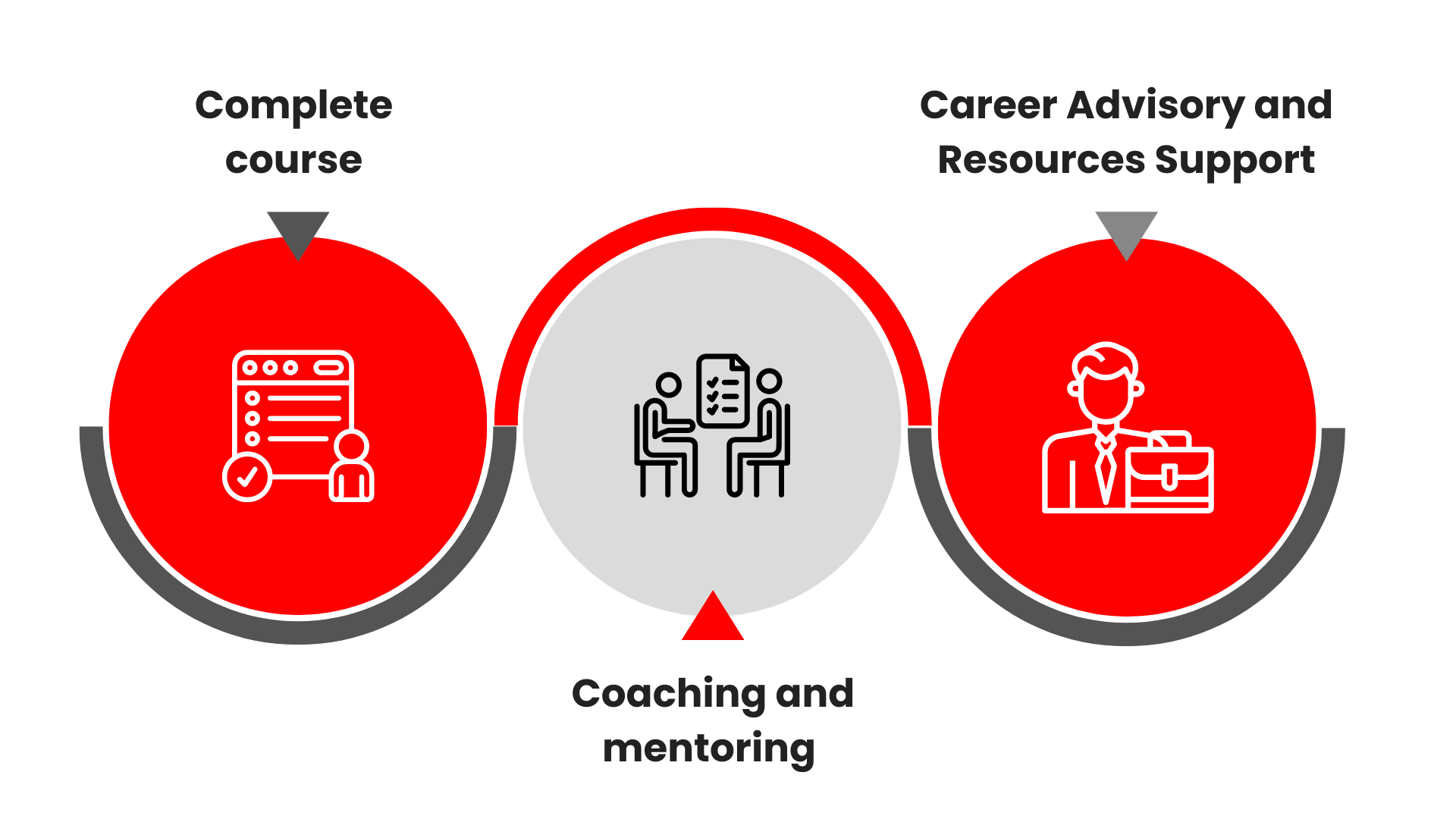
Upon completing this Advanced Certificate programme, you will receive coaching and mentorship by our programme advisors to complete your capstone project. This capstone project also serves as your portfolio, showcasing your knowledge and skills.
Once the project is completed, you’ll gain access to our dedicated career advisory and resources support. Our career services team will be readily available to provide assistance to enhance your employability, such as Career Assistance Workshops, resume building and interview tips, and more.
Course Fees and Subsidies
Criteria and/or Requirements for Course Subsidies
Baseline Funding Criteria and/or Requirements
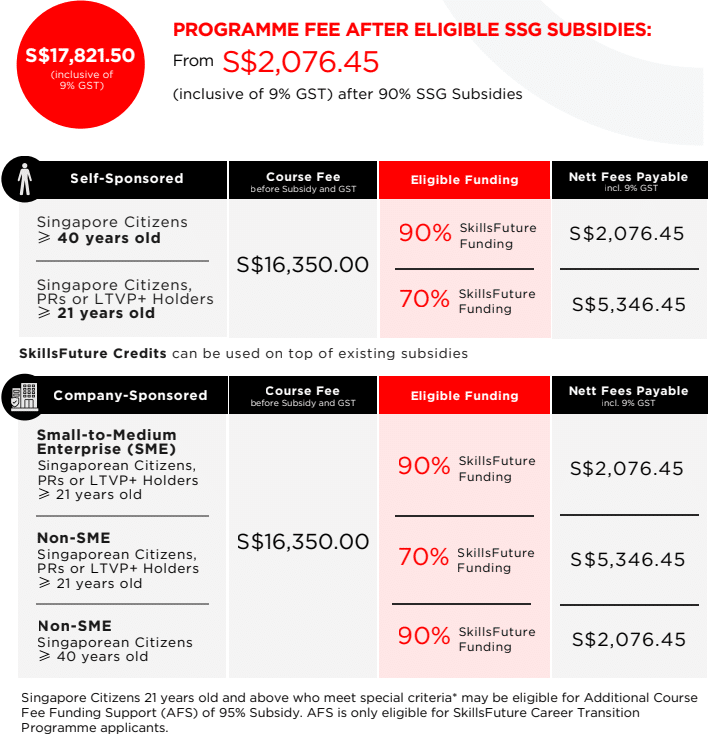
Trainee is 21 years old and above, and a
- Singaporean Citizen; or
- Permanent Resident; or
- Long Term Visitor Pass Plus (LTVP+) Holder
Will be eligible for 70% SkillsFuture Funding.
Nett course fee payable (including 9% GST): S$5,346,45
Course fees can be further offset by SkillsFuture Credit for Singapore Citizens aged 25 and above. Singapore Citizens aged 21 to 31 may also offset fees with the Post Secondary Education Account Funds.
Mid-Career Enhanced Subsidy (MCES) Criteria and/or Requirements
Trainee is 40 years old and above, and a Singaporean Citizen, will be eligible for 90% SkillsFuture Funding.
Nett course fee payable (including 9% GST): S$2,076.45
Course fees after subsidies can be further offset by SkillsFuture Credit.
Company-Sponsored (SMEs)
Enhanced Training Support for SMEs (ETSS) – 90% Funding
Eligible for SME Company-Sponsored, 21 years old and above, and a
- Singapore Citizen; or
- Permanent Resident; or
- Long-Term Visitor Pass Plus (LTVP+) Holder
Nett course fee payable (including 9% GST): S$2,076.45
Company-Sponsored (Non-SMEs)
SkillsFuture Baseline Funding – 70% Funding
Eligible Non-SME Company-Sponsored, 21 years old and above, and a
- Singaporean Citizen; or
- Permanent Resident; or
- Long Term Visitor Pass Plus (LTVP+) Holder
Nett course fee payable (including 9% GST): S$5,346,45
SkillsFuture Mid-Career Enhanced Subsidy (MCES) – 90% Funding
Eligible for Non-SME Company-Sponsored, Singapore Citizens, aged 40 years old and above
Nett course fee payable (including 9% GST): S$2,076.45
Additional Course Fee Funding Support (AFS) Criteria and/or Requirements
Trainee is 21 years old and above, a Singaporean Citzen, and
- Has been in long-term unemployment of 6 months or more*; or
- Recipient of ComCare Short-to-Medium Term Assistance (STMA)* or Workfare Income Supplement (WIS)*; or
- Person with Disabilities
Will be eligible for 95% SkillsFuture Funding.
Nett course fee payable (including 9% GST): S$1,258.95
Course fees can be further offset by SkillsFuture Credit for Singapore Citizens aged 25 and above. Singapore Citizens aged 21 to 31 may also offset fees with the Post Secondary Education Account Funds.
*Supporting documents such as CPF, approval letter, and/or payout letter is required to be submitted upon registration. You may request a copy from MSF Social Service Offices or via CPF’s Workfare Portal.
AFS is only eligible for SkillsFuture Career Transition Programme applicants.
NOTE: Trainees are entitled to the SSG training grant when they meet 75% of the training attendance and pass the requisite assessment. If trainees fail the assessment, they are required to re-take it immediately without additional fee. For more details see Course Funding Information.
Important Reminder: Your PSEA claim needs to be submitted at least 1 month before the course’s commencement date. Should you miss this deadline, an alternative payment method must be used to secure your spot in the course. After the disbursement of your PSEA funds to us, we will reach out to initiate the refund process.
Course Schedule
- Nov Weekdays Intake 1 (In-Person at IP)
- Dec Weekdays Intake 1 (In-Person at IP)
Location:
International Plaza (Tanjong Pagar MRT)
10 Anson Road #06-11
Singapore 079903
(8 hrs) Introduction to Information Technology (IT)
4 Nov 2026 (Wed) 9.00am - 6.00pm
(24 hrs) Understanding Computer Hardware & Peripherals
05, 06, 10 Nov 2026 (Thu, Fri, Tue) 9.00am - 6.00pm
(24 hrs) Operating Systems and Desktop Support
13, 16, 17 Nov 2026 (Fri, Mon, Tue) 9.00am - 6.00pm
(24 hrs) Network Fundamentals and Troubleshooting
20, 23, 24 Nov 2026 (Fri, Mon, Tue) 9.00am - 6.00pm
(24 hrs) Cybersecurity Essentials
27, 30 Nov 2026, 01 Dec 2026 (Fri, Mon, Tue) 9.00am - 6.00pm
(16 hrs) IT Troubleshooting and Problem Solving
07, 08 Dec 2026 (Mon, Tue) 9.00am - 6.00pm
(24 hrs) IT Service Management and Help Desk Operations (ITIL 4 Foundation)
14, 15, 16 Dec 2026 (Mon, Tue, Wed) 9.00am - 6.00pm
(32 hrs) Advanced Hardware and Software Troubleshooting
21, 22, 23, 24 Dec 2026 (Mon, Tue, Wed, Thu) 9.00am - 6.00pm
(40 hrs) Cloud Computing
30, 31 Dec 2026, 04, 05, 06 Jan 2027 (Wed, Thu, Mon, Tue, Wed) 9.00am - 6.00pm
(20 hrs) Capstone Project: Real-World IT Project
11 Jan 2027 (Mon)
12 Jan 2027 (Tue)
26 Feb 2027 (Fri)
(48 hrs) Advanced Network Administration
19, 20, 21, 22, 25, 26 Jan 2027 (Tue, Wed, Thu, Fri, Mon, Tue) 9.00am - 6.00pm
(48 hrs) Systems and Server Administration
29 Jan 2027, 01, 02, 03, 04, 05 Feb 2027 (Fri, Mon, Tue, Wed, Thu, Fri) 9.00am - 6.00pm
(32 hrs) Cybersecurity and Ethical Hacking
11, 12, 15, 16 Feb 2027 (Thu, Fri, Mon, Tue) 9.00am - 6.00pm
(16 hrs) Emerging Technologies and Trends
18, 19 Feb 2027 (Thu, Fri) 9.00am - 6.00pm
Location:
International Plaza (Tanjong Pagar MRT)
10 Anson Road #06-11
Singapore 079903
(8 hrs) Introduction to Information Technology (IT)
4 Dec 2026 (Fri) 9.00am - 6.00pm
(24 hrs) Understanding Computer Hardware & Peripherals
09, 10, 11 Dec 2026 (Wed, Thu, Fri) 9.00am - 6.00pm
(24 hrs) Operating Systems and Desktop Support
14, 15, 16 Dec 2026 (Mon, Tue, Wed) 9.00am - 6.00pm
(24 hrs) Network Fundamentals and Troubleshooting
21, 22, 23 Dec 2026 (Mon, Tue, Wed) 9.00am - 6.00pm
(24 hrs) Cybersecurity Essentials
30, 31 Dec 2026, 04 Jan 2027 (Wed, Thu, Mon) 9.00am - 6.00pm
(16 hrs) IT Troubleshooting and Problem Solving
05, 06 Jan 2027 (Tue, Wed) 9.00am - 6.00pm
(24 hrs) IT Service Management and Help Desk Operations (ITIL 4 Foundation)
11, 12, 13 Jan 2027 (Mon, Tue, Wed) 9.00am - 6.00pm
(32 hrs) Advanced Hardware and Software Troubleshooting
19, 20, 21, 22 Jan 2027 (Tue, Wed, Thu, Fri) 9.00am - 6.00pm
(40 hrs) Cloud Computing
28, 29 Jan 2027, 01, 02, 03 Feb 2027 (Thu, Fri, Mon, Tue, Wed) 9.00am - 6.00pm
(20 hrs) Capstone Project: Real-World IT Project
10 Feb 2027 (Wed)
11 Feb 2027 (Thu)
31 Mar 2027 (Wed)
(48 hrs) Advanced Network Administration
17, 18, 19, 22, 23, 24 Feb 2027 (Wed, Thu, Fri, Mon, Tue, Wed) 9.00am - 6.00pm
(48 hrs) Systems and Server Administration
26 Feb 2027, 01, 02, 03, 04, 05 Mar 2027 (Fri, Mon, Tue, Wed, Thu, Fri) 9.00am - 6.00pm
(32 hrs) Cybersecurity and Ethical Hacking
11, 12, 15, 16 Mar 2027 (Thu, Fri, Mon, Tue) 9.00am - 6.00pm
(16 hrs) Emerging Technologies and Trends
18, 19 Mar 2027 (Thu, Fri) 9.00am - 6.00pm
Frequently Asked Questions (FAQ)
Part-Time Training Allowance
I am 43 years old and currently working. Am I eligible for the Part-Time Training Allowance?
Yes, you are likely eligible if:
- You are a Singapore Citizen aged 40 and above.
- You are employed and have received income in the latest available 12-month period before your course start date or application date (whichever is later).
- You have not used up your 24-month lifetime allowance cap (combined full-time and part-time).
- You have a PayNow account linked to your NRIC.
Self-employed individuals with income declared to IRAS may also qualify. For more information on the eligibility criteria, visit the official SkillsFuture Service portal.
How much Training Allowance will I receive for part-time SCTP courses?
You will receive a flat rate of S$300 per month for each eligible month of training, provided you meet the minimum 75% monthly attendance requirement.
The total number of months you can claim is based on the approved duration of your course, rounded to the nearest half-month.
My part-time course runs from 15 February to 15 March. Will I receive the full $300 for both months?
Yes, SSG uses a front-loading approach. You will receive the full S$300 for the first month (February), and the remaining allowance will be paid for subsequent months based on attendance.
Always check your TA offer letter for your specific Maximum Eligible Period (MEP).
What happens if I miss the deadline to accept my Training Allowance offer?
You must accept your TA offer within 3 calendar days of receiving it. If you miss this deadline, your application will be cancelled, and you will need to submit a new application.
We recommend logging into the TA Portal regularly to check your application status.
Can I apply for Training Allowance if I am self-employed or have no CPF contributions?
Yes, if you are self-employed and have declared your trade income to IRAS, SSG will use the latest available IRAS data to assess your eligibility.
If you have no CPF contributions but have earned income in the last 12 months, you may still qualify. The best way to check is to log in to the TA Portal and submit an application; the system will determine your eligibility automatically.
If you encounter issues, you may contact SSG via their Service Portal.
Where can I find and search for courses that are eligible for the Part-Time Training Allowance?
You can search for all TA-eligible courses, including part-time ones, directly on the MySkillsFuture portal. This is the official course directory where you can filter for programmes that qualify for the Training Allowance.
Follow these simple steps:
- Login to www.myskillsfuture.gov.sg with your Singpass.
- Search for a course title or keyword related to your area of interest.
- Apply the filter: Under the "Featured Initiatives" filter, check the box for "SkillsFuture Mid-Career Training Allowance (Part-Time)" . This will show you only the courses that are eligible.
Tip: All our SCTP courses listed on the @ASK Training website are also PT TA-eligible. You can also find them on the MySkillsFuture portal by searching for our course titles or UEN.
Do I need to repay my Part-Time Training Allowance if I fail my course assessment?
No. The Training Allowance is not based on whether you pass your course assessment. It is paid based on your fulfilment of the minimum 75% monthly attendance requirement.
As long as you met the attendance criteria and provided truthful information in your application, you do not need to repay any disbursed allowance.
Still Have Questions?
The SkillsFuture Service Portal contains:
- Detailed FAQs on Part-Time Training Allowance
- Guides and resources
- Submit an enquiry if you have further questions
Speak to a programme consultant
Have questions? Speak to our program consultants!