

Using Excel every day does not necessarily mean your team is using it efficiently.
A spreadsheet may get the job done, but look more closely, and you may find employees repeatedly copying and pasting data, rebuilding reports from scratch, checking formulas manually, or relying on one colleague to solve more complicated spreadsheet problems.
These small inefficiencies can add up, particularly when employees repeat the same tasks every week or month. They can also lead to inconsistent working methods, avoidable errors, and delays when spreadsheets need to be updated, checked, or shared.
The greatest benefits of Excel training do not necessarily come from learning advanced features.
Instead, it comes from helping your employees improve the recurring tasks they already perform, whether that means updating a tracker, preparing an HR report, reconciling figures or consolidating operational data.
The question, then, isn’t whether your team knows how to use Excel; it’s whether they’re using it in the most effective way for their work.
This article shows you how stronger Excel skills can help Admin, HR, Finance and Operations teams reduce repetitive work, improve consistency and spend more time on higher-value activities.
It also explores when team-wide training may be worthwhile and how you can choose training that addresses your team’s actual workplace needs.
Why Do Teams Still Lose So Much Time in Excel?
Excel is flexible, but that flexibility can also lead to different people solving the same problem in different ways.
One employee may use a formula, another may copy and paste values, while someone else may maintain a separate spreadsheet altogether. Over time, these workarounds can become part of the team’s normal process.
Where The Time Goes
Common sources of spreadsheet inefficiency include:
- Manually cleaning and reformatting data
- Repeating the same calculations every reporting period
- Searching through large spreadsheets for individual records
- Copying information between multiple workbooks
- Rebuilding reports instead of updating an existing structure
- Checking for errors only after entering the data
These problems don’t necessarily mean your employees lack commitment or ability. Often, they reflect skill gaps that develop as responsibilities become more complex.
To put that in perspective: a report that takes even three or four hours a month to rebuild manually adds up to roughly two working weeks a year, once you count the data cleaning, checking, and re-checking involved.
Multiply that across a team of five or ten people doing similar work, and spreadsheet maintenance can quietly become one of the more expensive recurring tasks in the department.
Training can help your employees recognise these recurring inefficiencies and replace unnecessary manual steps with more structured ways of working.
How Excel Training Turns Repeated Tasks into Faster Workflows
Excel training for employees delivers the greatest value when it connects directly to the work your employees actually do.
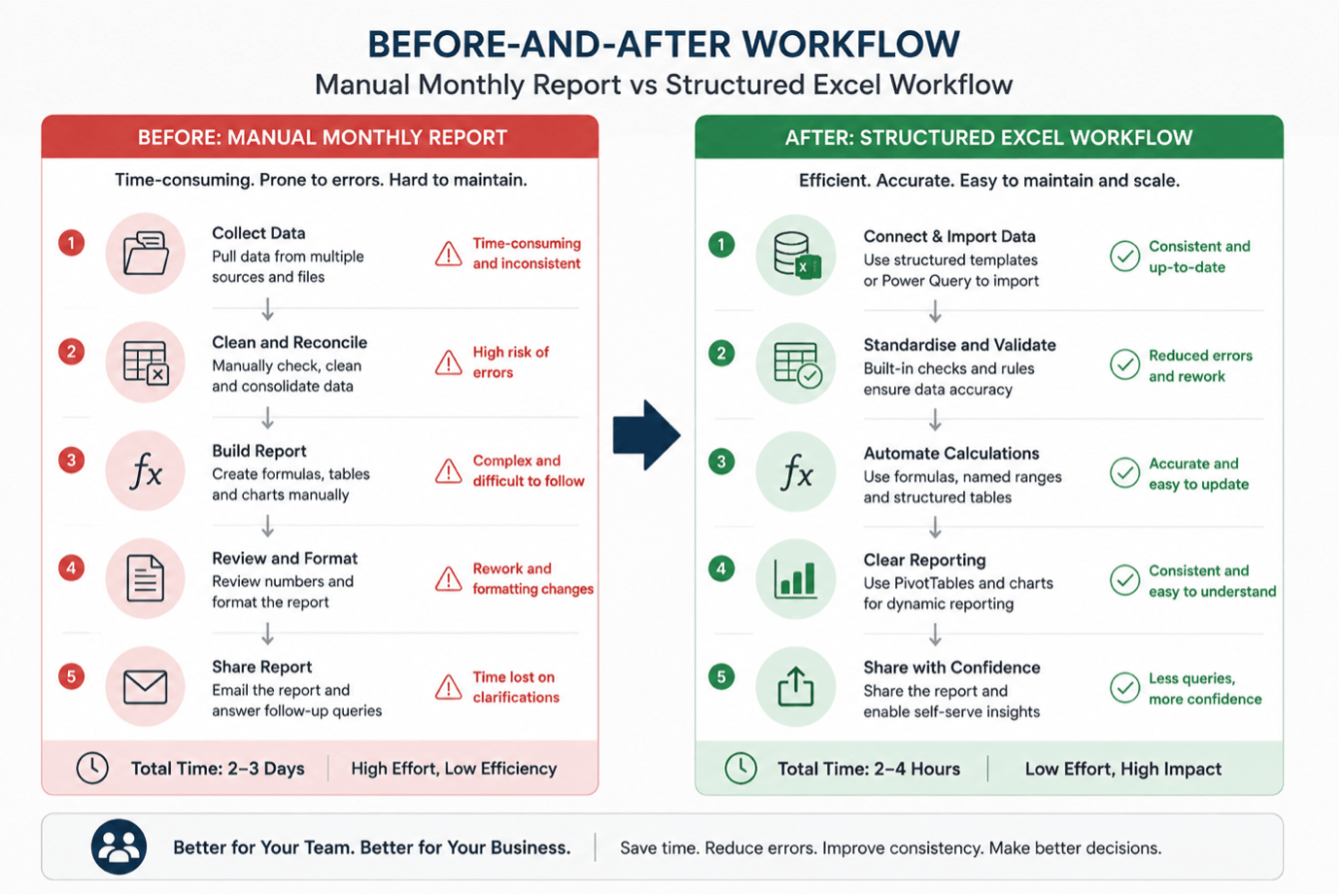
Rather than simply teaching a list of functions, practical training shows your employees how to turn recurring processes into reusable workflows.
An employee who manually calculates monthly totals, for example, may learn how to structure the source data properly and use formulas that update when new records are added.
Someone who spends time compiling weekly figures may learn how a PivotTable can summarise the same information more efficiently.
Excel Tables are particularly useful because they provide structured data, filtering and sorting capabilities, while supporting structured references in formulas. Microsoft also notes that Tables can help maintain data integrity through features such as Data Validation.
Focus On Recurring Work, Not Advanced Features
The objective is not to make every employee an advanced Excel user.
A more practical approach is to identify the tasks your employees repeat most often and consider whether Excel can handle them more efficiently.
Employees can then redirect time saved from repetitive preparation toward checking results, investigating exceptions, analysing information, and making decisions.
Here’s what that shift can look like in practice – a manual monthly report turned into a structured, repeatable Excel workflow:
How Excel Training Helps Admin Teams Work Faster
Your Admin team likely maintains trackers, schedules, contact lists, records and recurring reports. These may look straightforward, but they can become time-consuming as the number of records increases.
For example, your Admin team might maintain a list of suppliers or service requests. If employees manually format new rows, search for information, and enter categories differently, the spreadsheet can quickly become inconsistent.
Common Admin Spreadsheet Tasks
Excel training for Admin teams can introduce practical skills such as:
- Excel Tables for structured records
- Sorting and filtering to find information quickly
- Data Validation to standardise entries
- Lookup functions to retrieve information from related lists
- Basic formulas for recurring calculations
Consider a facilities tracker containing hundreds of requests. Instead of manually formatting every new entry, the team can structure the tracker as a Table, use drop-down lists for categories and filter the data by status or responsible employee.
Excel Tables are designed to make groups of related data easier to manage and analyse, with features such as filtering and calculated columns built into the structure.
The result is not a more complicated spreadsheet. It is a more consistent way of working.
Here’s an example of what an Admin tracker looks like once it’s built as a Table with drop-down categories and filters:

How Excel Training Helps HR Teams Work Faster
Your HR team regularly works with employee records, attendance, leave, recruitment information and workforce reports.
Many of these activities involve recurring data updates and reporting. A small amount of manual work repeated across hundreds of employees can quickly become a significant administrative burden.
Making Routine HR Reporting Easier
Excel training for HR teams can help employees use formulas, lookup functions, Conditional Formatting and PivotTables to manage everyday reporting tasks more efficiently.
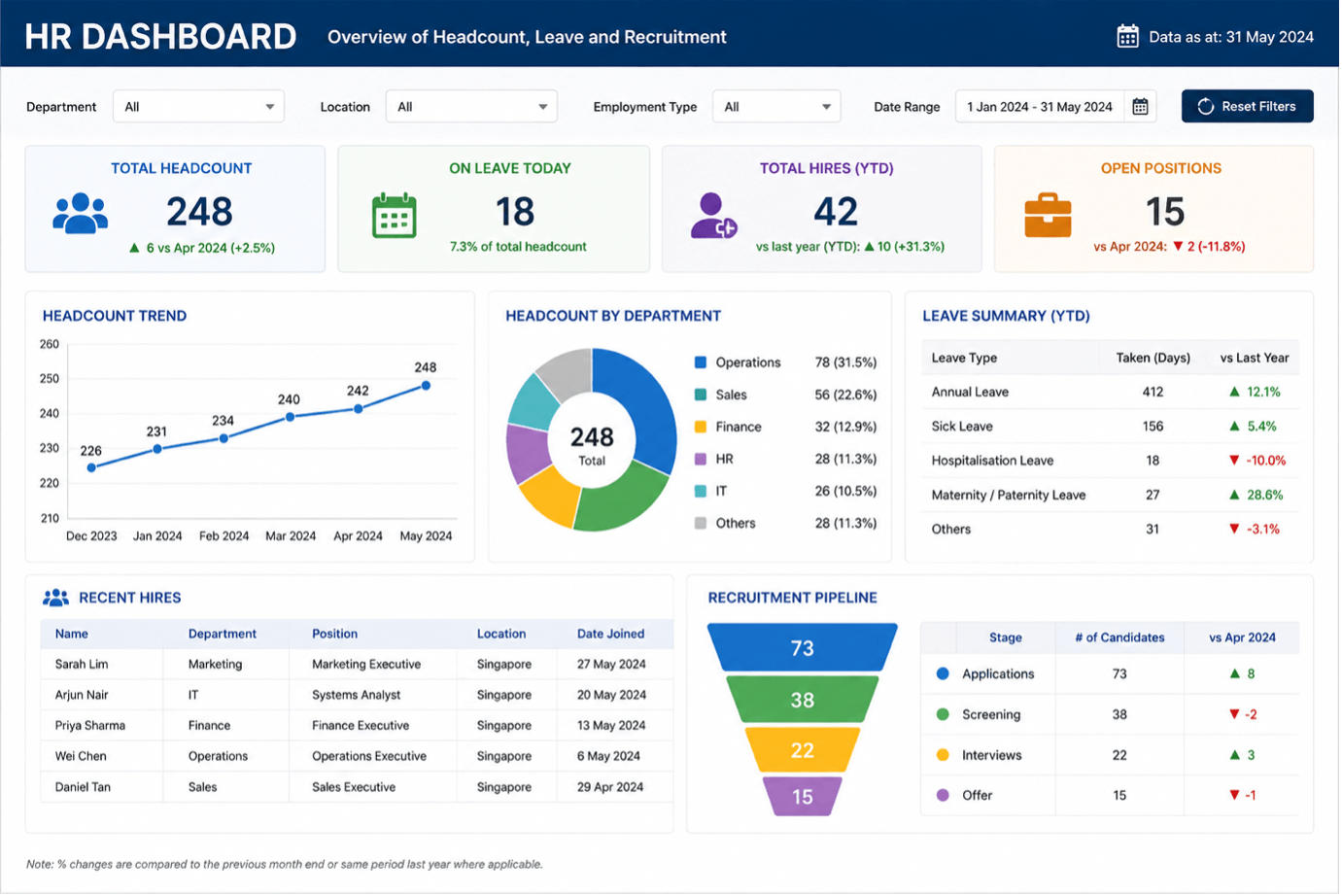
For example, an HR team preparing a monthly headcount report could use a PivotTable to summarise employee information by department, employment status or other relevant categories.
Microsoft describes PivotTables as a way to summarise, analyse, explore and present data, making them useful for recurring reporting tasks.
Conditional Formatting can also help draw attention to information that requires review, such as approaching dates or unusual values.
The aim is not to turn HR administrators into data analysts. It is to make routine spreadsheet work easier to manage and review.
Here’s an example of the kind of HR dashboard these skills can help your team build:
How Excel Training Helps Finance Teams Work Faster
Your Finance teams have a particularly strong reason to value accurate and consistent spreadsheet practices.
Budgets, forecasts, reconciliations and management reports often involve multiple calculations and sources of information. When these processes depend heavily on manual copying or poorly structured formulas, errors can become harder to detect.
Faster Calculations and Easier Checking
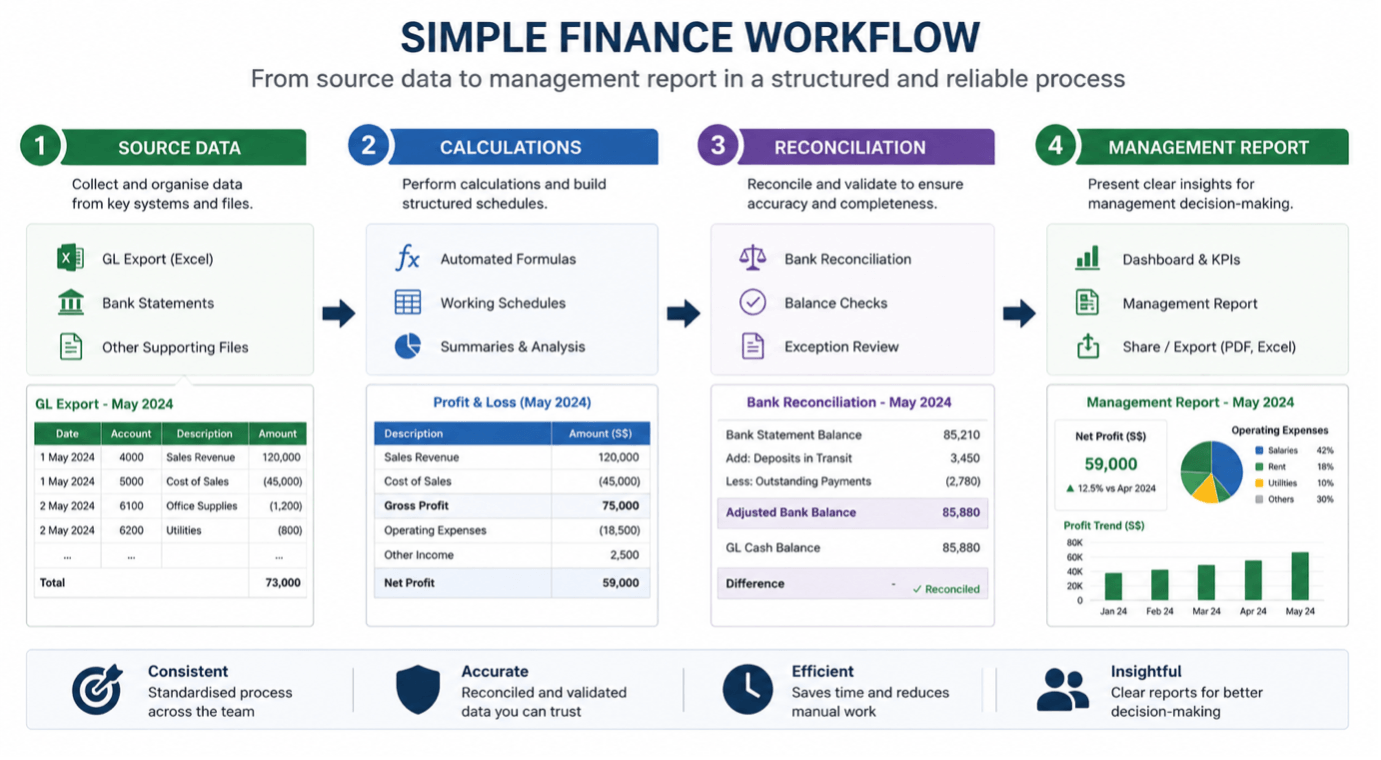
Excel training for Finance teams can strengthen skills in formulas, structured spreadsheets, lookups, reconciliation techniques and checking processes.
For instance, rather than manually comparing two lists of transactions, employees can learn appropriate lookup or comparison techniques to identify differences more systematically.
Good spreadsheet practices also make workbooks easier for another employee or manager to review. This matters when reports need to be checked, updated, or handed over.
The objective is therefore twofold: improve speed while maintaining the controls needed for reliable financial work.
Here’s what a structured Finance workflow can look like, from source data to management report:
How Excel Training Helps Operations Teams Work Faster
Your operations teams often deal with information that changes continuously. It needs to update and consolidate inventory, orders, schedules, service levels, and performance figures regularly.
Turning operational data into useful reports
Excel training for Operations teams can help employees structure operational data, identify exceptions, and produce recurring reports more efficiently.
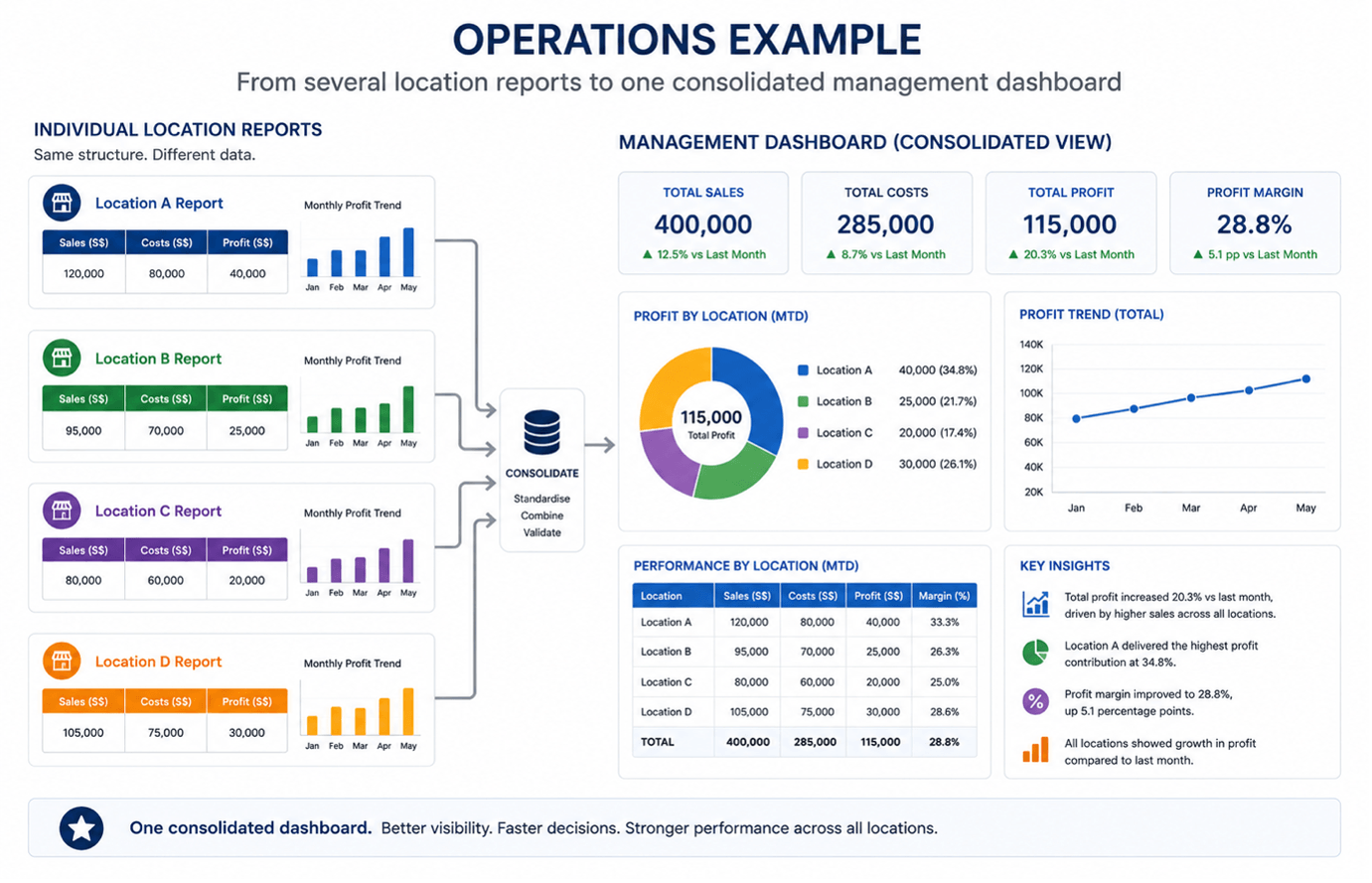
Imagine several locations submitting weekly inventory reports using slightly different formats. Someone may need to consolidate the files manually before management can see the overall picture.
With stronger Excel skills, your team can work towards a more structured reporting process. Tables, formulas, lookups and PivotTables can help organise information and make it easier to identify issues such as low stock, delayed orders or unusual performance figures.
Excel can also help teams consolidate information from multiple tables, making it easier to analyse operational data from different sources and to produce a more complete view of performance.
Here’s an example of several location reports consolidated into a single management dashboard:
Which Excel Skills Benefit All Four Teams?
Although Admin, HR, Finance, and Operations have different responsibilities, many of their Excel spreadsheet challenges are surprisingly similar.
The Common Foundation
The most useful shared skills often include:
- Structuring data in Tables
- Using formulas correctly and consistently
- Applying lookup functions
- Sorting and filtering data
- Using Data Validation to reduce inconsistent entries
- Creating PivotTables for recurring reporting
- Applying Conditional Formatting to highlight information requiring attention
- Building spreadsheets that other team members can understand and maintain
The same skill can solve different problems depending on the department.
A lookup may help HR retrieve employee information, Finance compare transactions, Admin retrieve supplier details, or Operations connect inventory information with product data.
This is why Microsoft Excel training can be more effective when it starts with workplace tasks rather than simply teaching features in isolation.
Where Does AI Fit Into This?
AI tools such as Microsoft Copilot can now write formulas, summarise data and even build PivotTables on request.
It’s a fair question: if AI can do this, why invest in Excel training at all? The short answer is that AI tools are only as reliable as the person reviewing their output.
Copilot might generate a formula that looks correct but references the wrong range, or a summary that misses an exception the underlying data actually contains.
Employees who understand how Excel works are in a far better position to catch these issues, refine what the AI produces, and judge when to trust automation and when to check it manually.
AI As An Accelerator, Not A Replacement.
Rather than replacing the need for Excel skills, AI tools tend to reward them. Employees with a solid foundation can describe what they need more precisely, verify AI-generated formulas faster, and combine AI-assisted steps with structured data and reusable workflows.
In practice, Excel training and AI tools work best together rather than as substitutes for one another.
How Inconsistent Excel Habits Affect Team Productivity
Your employees naturally develop their own ways of working, particularly when they learn Excel through online tutorials, previous jobs, or trial and error.
Self-learning is useful. It can help employees solve immediate problems and explore new capabilities.
However, when everyone develops a different method, the team can end up with inconsistent formulas, layouts, naming conventions, and reporting processes.
This creates problems when spreadsheets are shared.
When different methods become a team problem
A workbook that makes perfect sense to its creator may be difficult for a colleague to understand. A formula may work, but another employee may not know how it was constructed.
Someone may also need to reformat the report each time a new colleague takes responsibility for it.
Workplace Excel training can give employees a shared foundation and a more consistent way of working. This includes how data is structured, how common tasks are performed, and how information is prepared for others.
Why Relying on One Excel Expert Creates a Bottleneck
Chances are, your team has an unofficial Excel expert.
When a complicated formula breaks, a report needs updating, or a workbook needs to be redesigned, everyone knows who to ask.
The Hidden Cost Of Dependency
At first, this may seem efficient. In practice, it can create a dependency.
If that person goes on leave, moves to another department, or leaves the organisation, other employees may struggle to maintain important workbooks.
There is also a hidden productivity cost. The Excel expert’s time is repeatedly interrupted by requests that could potentially be handled by other team members with the right training.
Instead, employee Excel skills can be developed broadly enough that routine problems can be solved within the team, while genuinely complex tasks remain with the most experienced users.
Why Team-Wide Excel Training Can Be More Effective
Individual training can address a specific skill gap. Team training can also address how people work together.
Creating A Common Way Of Working
With Excel training for teams, employees can learn a common set of methods and then practise applying those skills to realistic workplace scenarios. This is particularly useful when several employees contribute to the same reporting process.
For example, a team exercise could involve taking an untidy dataset, standardising it, applying formulas, creating a PivotTable and producing a simple management report.
Employees are not simply learning where a function is located; they are learning how the pieces fit into an actual workflow.
Make Training Relevant To The Workplace
Singapore’s SkillsFuture initiatives support workplace-relevant digital skills development. The SkillsFuture for Digital Workplace programme, for example, is designed to help individuals develop digital skills for the workplace.
Organisations can also explore employer-focused SkillsFuture resources when planning workforce development.
This reflects an important principle: training tends to be more useful when employees can connect what they learn directly to their jobs.
When Is Excel Training Worth the Investment?
Training is worth considering when Excel has become an important part of a team’s daily work, and inefficiencies are recurring rather than occasional.
Look For Recurring Problems
Look for signs such as:
- Employees spend significant time preparing recurring reports
- The same information is repeatedly copied between files
- Manual processes create errors or rework
- Employees rely heavily on one Excel expert
- Different employees use different methods for the same task
- New employees take a long time to understand existing workbooks
- Managers have difficulty getting consistent reports from different teams
A simple way to use this list: Count how many apply to your team. Three or more is usually a sign that the issue is a genuine skill gap worth addressing, not just an occasional bad week.
Five or more suggests the gaps are consistent enough that team-wide training would likely pay off faster than continuing to work around them.
Before choosing a course, measure the problem. Ask your employees which spreadsheet tasks consume the most time, identify where errors or rework occur, and estimate how frequently the task is repeated.
This provides a more practical basis for evaluating Excel productivity training.
Measure Outcomes, Not Just Course Completion
The value of training can be considered through practical outcomes such as:
- Less time spent on recurring spreadsheet tasks
- Less rework caused by inconsistent data or formulas
- Greater independence among employees
- More consistent reporting processes
- Easier handovers between colleagues
These measures do not guarantee a specific financial return, but they provide a more useful way to assess whether training is addressing a genuine workplace need.
Singapore’s broader digitalisation agenda also highlights the importance of developing workforce capabilities as technology becomes more deeply integrated across businesses and sectors.
IMDA’s Singapore Digital Economy Report 2025 reported that Singapore’s digital economy accounted for 18.6% of GDP in 2024, with digitalisation extending well beyond the technology sector.
For department heads, this simply reflects what many already observe: Admin, HR, Finance, and Operations teams are handling more data-related tasks than before.
Strengthening employee Excel skills is one practical way to ensure teams can keep up with these changing expectations.
How to Choose Excel Training for Different Departments
Not every team needs the same level of Excel training.
Start With The Work, Not The Course
Start by identifying the tasks each department performs and where your employees experience the greatest difficulties.
An Admin team may need stronger skills in data organisation, filtering and lookups. HR may need practical reporting and data management skills.
Finance may require more emphasis on formulas, reconciliation and checking. Operations may benefit from data consolidation, reporting and exception tracking.
This does not mean every department needs a completely separate programme. A common foundation can be taught across the organisation, followed by department-specific examples and exercises.
Look For Practical, Workplace-Focused Training
When comparing Excel courses for working professionals, look for programmes that:
- Use realistic workplace examples.
- Provide hands-on exercises rather than only demonstrations.
- Build skills progressively from essential to more advanced techniques.
- Address the actual tasks employees perform.
- Help participants apply the skills to their own workflows.
- Encourage consistent practices that can be shared across the team.
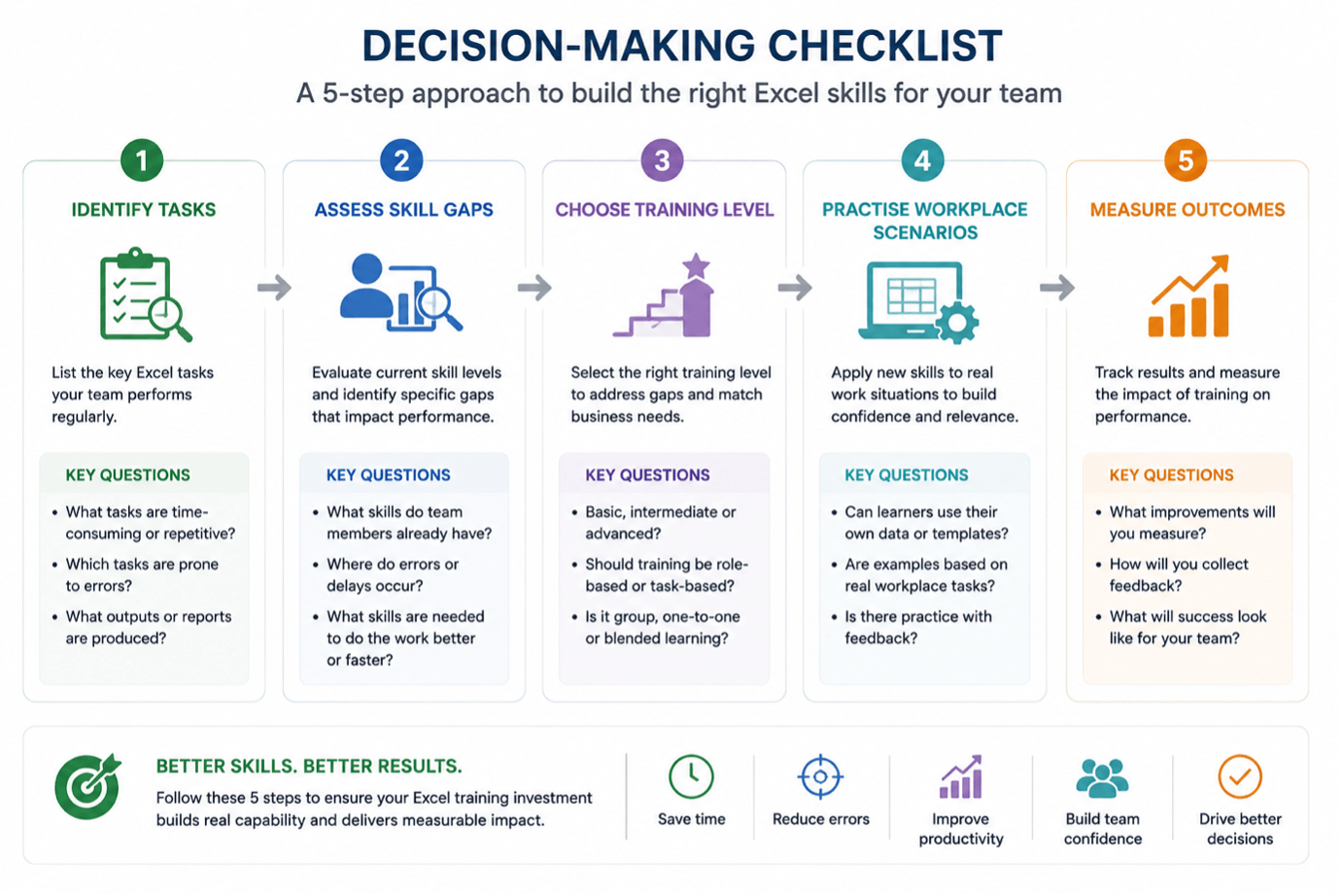
Use this 5-step checklist to guide the decision:
Conclusion
Excel is often treated as a basic workplace tool, but how your teams use it can significantly affect how efficiently they handle recurring work.
For Admin, HR, Finance and Operations teams, stronger spreadsheet skills can reduce repetitive manual work, improve consistency and make information easier to check and share.
The value of corporate Excel training is therefore not simply learning more Excel features. It is about helping employees work differently:
- structuring information properly
- automating appropriate steps
- reducing avoidable errors
- creating processes that other team members can understand
Before investing in training, identify where your team is actually losing time:
- Which tasks are repeated every week or month?
- Where does rework occur?
- Which spreadsheets depend on one experienced employee?
The answers can help you decide whether Excel training for Admin teams, HR teams, Finance teams, or Operations teams is right for your team, and which skills to prioritise.
For organisations in Singapore considering an Excel course Singapore, choosing the right programme is important. The most useful starting point is not necessarily the most advanced course available. It is training that addresses the team’s real work.
When your employees can apply what they learn immediately, Excel becomes more than a spreadsheet tool. It becomes a more consistent and efficient way for your team to get everyday work done.
Ready to Build a More Capable Team?
If the challenges described in this article sound familiar, structured training may be the practical next step.
@ASK Training offers practical, hands-on Microsoft Excel courses designed for working professionals.
Here are three programmes particularly relevant for Admin, HR, Finance, and Operations teams:
- WSQ Microsoft Excel Essentials (Teams needing a structured foundation): Learn to organise, filter, and summarise data in minutes rather than hours.
- WSQ Microsoft Excel Intermediate (Teams managing recurring reports): Master VLOOKUP, IF functions, and PivotTables to summarise complex information with confidence.
- Microsoft Excel Advanced (Teams handling complex data analysis): Build advanced formulas, automate tasks with macros, and create dynamic PivotTables for deeper insights.
For organisations looking to address department-specific workflows, our corporate training solutions can be customised or contextualised to your industry, ensuring your employees apply what they learn immediately.
Explore your options today with a complimentary training needs analysis via our corporate training programme!
The right training doesn’t just teach Excel; it transforms how your teams work.
Related Courses
◆◆◆
Related Articles
Article Topics
- Why Teams Lose Time in Excel
- Turning Repeated Tasks into Faster Workflows
- Excel Training for Admin Teams
- Excel Training for HR Teams
- Excel Training for Finance Teams
- Excel Training for Operations Teams
- Skills That Benefit All Four Teams
- Where AI Fits In
- Inconsistent Excel Habits
- The One-Expert Bottleneck
- Why Team-Wide Training Works
- When Training Is Worth the Investment
- Choosing Training for Each Department
- Conclusion