
You don’t need a computer science degree. You don’t need to know how to code.
And you definitely don’t need to wait until you “feel ready.” What matters is curiosity, problem-solving, and a willingness to learn!
If you’re starting from scratch and wondering, “Is IT support a good entry-level job if I’m starting from zero?”, the answer is a resounding yes, and you’re already in the right place to find out exactly why with this guide!
Many fresh graduates, career switchers, or even office workers curious about tech ask the same question.
IT support roles are often the essential “first rung” into the tech world because they are hands-on and problem-based. By diving directly into the daily realities of devices, networks, and user interactions, you build the real-world habits and technical confidence that textbooks alone cannot provide.
By the end of this guide, you’ll understand what entry-level IT support really involves, the skills you need, what the day-to-day looks like, and concrete ways to start, even if you have no prior experience.
To begin your journey, let’s clarify what “entry-level” really means in the context of a modern IT department.
What “Entry-Level IT Support” Actually Means
At its heart, an entry-level IT support role means acting as the first point of contact for everyday technical issues in an organisation.
You are the person who keeps the wheels turning by assisting users with devices, logins, software access, printers, and basic network connectivity.
While the job titles you see on LinkedIn or MyCareersFuture may vary, the core mission is consistent: helping people resolve common technical issues quickly and reliably so they can get back to work.
In many Singapore workplaces, these roles focus on resolving high-volume, repeatable problems rather than designing complex systems.
Common Job Titles to Watch For
To help you match your expectations to job listings, here are the three most common roles you’ll encounter:
- Help Desk / Service Desk Technician – usually remote support via calls, chat, or tickets.
- Desktop Support Technician – in-person support, device setup, peripheral fixes.
- IT Support Specialist / Technician – may combine remote and on-site work, handling routine hardware and software issues.
Example:
While a Help Desk technician might help a user reset their password or troubleshoot an email error over the phone, a Desktop Support technician is the one who physically sets up the workstations for new hires or swaps out a faulty monitor in the office.
What It Is NOT
It is just as important to understand what you won’t be doing on day one to avoid feeling overwhelmed:
- It is NOT programming: You won’t be expected to write code or build software.
- It is NOT complex architecture: You aren’t responsible for designing entire corporate networks or building servers from scratch.
- It is NOT deep administration: Deep system administration knowledge isn’t a prerequisite for day one.
Instead, your value lies in structured troubleshooting, clear communication, and following established processes to solve everyday problems efficiently.
Instead, the focus is on solving everyday technical problems efficiently through structured troubleshooting, clear communication, and following established processes.
Roles at a Glance
Help Desk / Service Desk
- Location: Mostly remote (Office-based support centre or Hybrid/WFH).
- Core Tasks: First-line support via calls/email; password resets; basic software and login issues; initial triage and escalation.
- The Difference: While similar, a Help Desk is tactical (fixing immediate tech “bugs”), whereas a Service Desk is broader, managing overall business requests and communication based on frameworks like ITIL.
- Tools: Ticketing systems (ServiceNow, Jira), remote tools (AnyDesk, TeamViewer), and account management tools.
Desktop Support
- Location: On-site (Office, campus, or client premises).
- Core Tasks: Hands-on device setup; laptop troubleshooting; peripheral issues (printers, monitors); OS installs; basic network checks.
- Tools: Imaging tools, device management systems, and diagnostic utilities.
IT Support Technician
- Location: Mix of on-site and remote.
- Core Tasks: Handling issues escalated from Help Desk (2nd-line support); complex workstation setup; software installs; user account tasks; resolving recurring hardware and software issues.
- The Distinction: The Technician steps in as the second layer of support when a problem requires deeper system access, more time, or a physical visit to the user’s desk.
- Tools: Remote access tools, ticketing systems, and basic admin consoles (e.g., user permissions).
Now that we have defined the roles, let’s explore why this career path is so accessible for those just starting out.
Why IT Support Is Beginner-Friendly
If you are worried that you aren’t “techy” enough to start, you’ll be glad to know that IT support for beginners is surprisingly approachable. This is because a significant portion of the workload consists of pattern-based, learnable issues.
Think of these common scenarios you likely already encounter:
- Password Resets: Helping a user regain access to their account.
- Connectivity: Troubleshooting why a laptop won’t connect to the office Wi-Fi or a printer.
- Performance: Investigating why a device is running slow or a specific app won’t open.
- Access Errors: Ensuring a staff member has the right permissions for a shared folder.
Rapid Growth Through Repetition
Because these patterns repeat daily, you don’t need to be a genius to succeed; you just need to be observant and methodical. Beginners in this field grow exceptionally fast due to constant feedback loops.
Every ticket you handle and every troubleshooting step you document reinforces the right technical habits.
Over time, what felt like a complex puzzle on day one becomes a routine “fix” you can perform in minutes.
For example, after handling 10 password reset tickets, you’ll instinctively know the quickest fix without checking the playbook.
Mentorship and On-the-Job Training (OJT)
In the Singapore job market, many companies recognise that entry-level staff are there to learn.
Many job postings explicitly mention on-the-job training (OJT) or structured mentoring programmes.
With the combination of internal playbooks (step-by-step guides), repeatable issues, and a supportive team environment, IT support serves as the ideal, low-barrier-to-entry first step into the tech industry.
By understanding these common patterns, you’ll soon find yourself navigating the daily workflow of an IT professional with ease.
What You’ll Do Day-to-Day in an Entry-Level IT Support Job
To understand whether IT support is the right starting point for you, it helps to know what the work actually looks like day-to-day.
Most entry-level IT support roles follow a repeatable, structured workflow. Once you understand this flow, the job becomes far less intimidating.
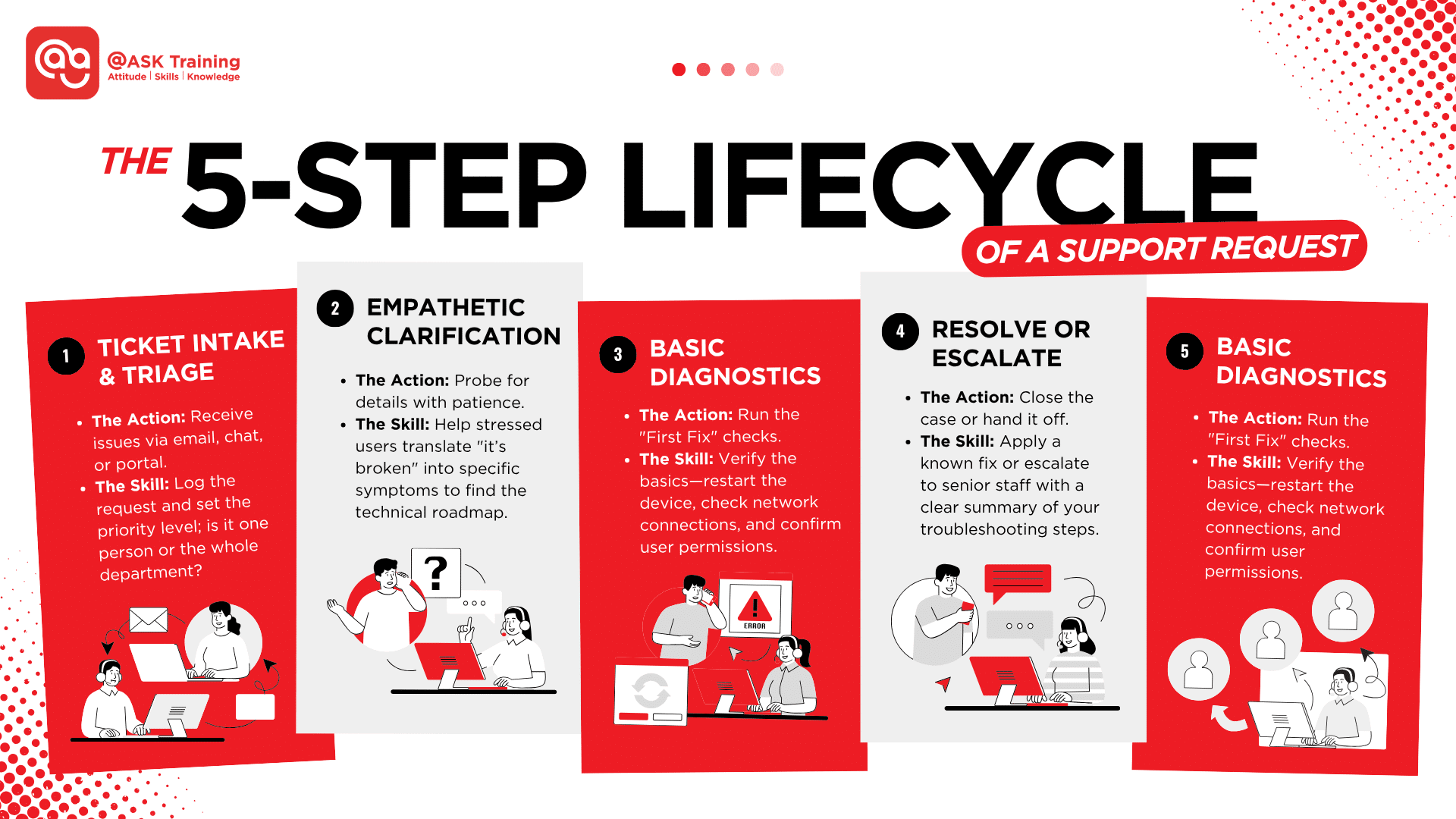
The Lifecycle of a Support Request
Here’s a realistic view of the daily workflow:
Ticket Intake & Prioritisation
- Issues arrive via email, chat, or a portal.
- This is where you practice ticketing system basics – logging the request, assigning a priority level (is it one person or the whole department?), and keeping the user updated.
Clarify Symptoms with Empathy
- Users rarely use technical terms, and they are often stressed (e.g., a laptop dying 10 minutes before a major presentation).
- Your role is to probe with patience and empathy, asking targeted questions to turn “it’s broken” into specific symptoms.
Basic Diagnostics
- You’ll run standard checks, e.g., restarting the device, verifying the network connection, and checking permissions.
Resolution or Escalation:
- You either apply a known fix or escalate to senior staff if the issue is complex, with a clear summary of what you’ve already tried.
Documentation:
- You record the fix in the system. This builds a knowledge base so the next person (or you, next week) can solve it even faster.
Example: “My Internet is Down”
Instead of guessing, you’ll learn to narrow it down with three quick checks:
- Is it only one device? (If yes, it’s a hardware/settings issue; if no, it’s a network issue).
- Is Wi-Fi connected but showing “No Internet”? (This suggests a DNS or IP assignment problem).
- Are there specific error messages? From there, you try one fix at a time, reconnecting, renewing the IP address, or checking DNS settings, and record exactly what worked.
Common daily responsibilities in Singapore offices: workstation setup, software installation, printer support, account management, and updating tickets.
Mastering this daily cycle of troubleshooting and documentation is the fastest way to build professional confidence.
However, to handle these tasks effectively, you’ll need a specific blend of foundational knowledge and interpersonal strengths.
Skills You Need to Start (and What You Can Learn on the Job)
When people hesitate about starting in IT support, it’s often because they assume that advanced technical knowledge is a prerequisite.
In reality, employers at this level look for solid fundamentals, a methodical approach, and great communication.
This section breaks down the IT support specialist skills required for an entry-level role, and which ones you can continue developing on the job.
Technical Foundations (What You Should Have or Start Learning)
These are the core technical skills employers expect at a beginner level, not mastery, but familiarity.
HardwareBasics
- You should understand the main computer components (CPU, RAM, storage, motherboard, peripherals) and how common hardware problems show up.
- Examples: Recognising when a slow PC may be caused by low memory, identifying a failing hard drive from unusual noises, or checking cable connections when a monitor doesn’t turn on.
Operating System Basics
- Most entry-level roles in Singapore operate within a Windows-based environment.
- You should be comfortable navigating system settings, managing updates, installing drivers, and adjusting basic permissions.
- Pro Tip: Familiarity with Active Directory basics is also helpful for managing user accounts, resetting passwords, and assigning access rights in many office environments.
- Examples: updating Windows, reinstalling a faulty driver, setting the correct default printer, or adjusting user display and audio settings.
Networking Fundamentals
- You don’t need to design networks, but you should understand how devices connect.
- This includes knowing the difference between Wi-Fi and Ethernet, what an IP address does, and basic connectivity checks.
- Examples: reconnecting a device to Wi-Fi, testing another network port, renewing an IP address, or checking whether the issue affects one user or the entire office.
Security Awareness
- Entry-level IT support plays a frontline role in basic security hygiene.
- This includes spotting obvious malware symptoms, guiding safe password resets, and knowing when something needs escalation.
- Examples: running a malware scan, advising users on suspicious emails, or locking an account after multiple failed login attempts.
People and Process Skills (Often More Important Than Tech Skills)
Many beginners underestimate these skills, but they are often what set a great technician apart:
- Active Communication and Empathy: Users often struggle to describe technical failures. By providing helpful clues and probing with patience, you help a stressed user provide the insights needed to solve the problem.
- Documentation Habits: Keeping clear notes of your “fixes.” If it isn’t documented, the knowledge is lost.
- Prioritisation & Escalation: Learning that a CEO’s broken laptop or a shared office printer outage takes priority over a non-urgent software update.
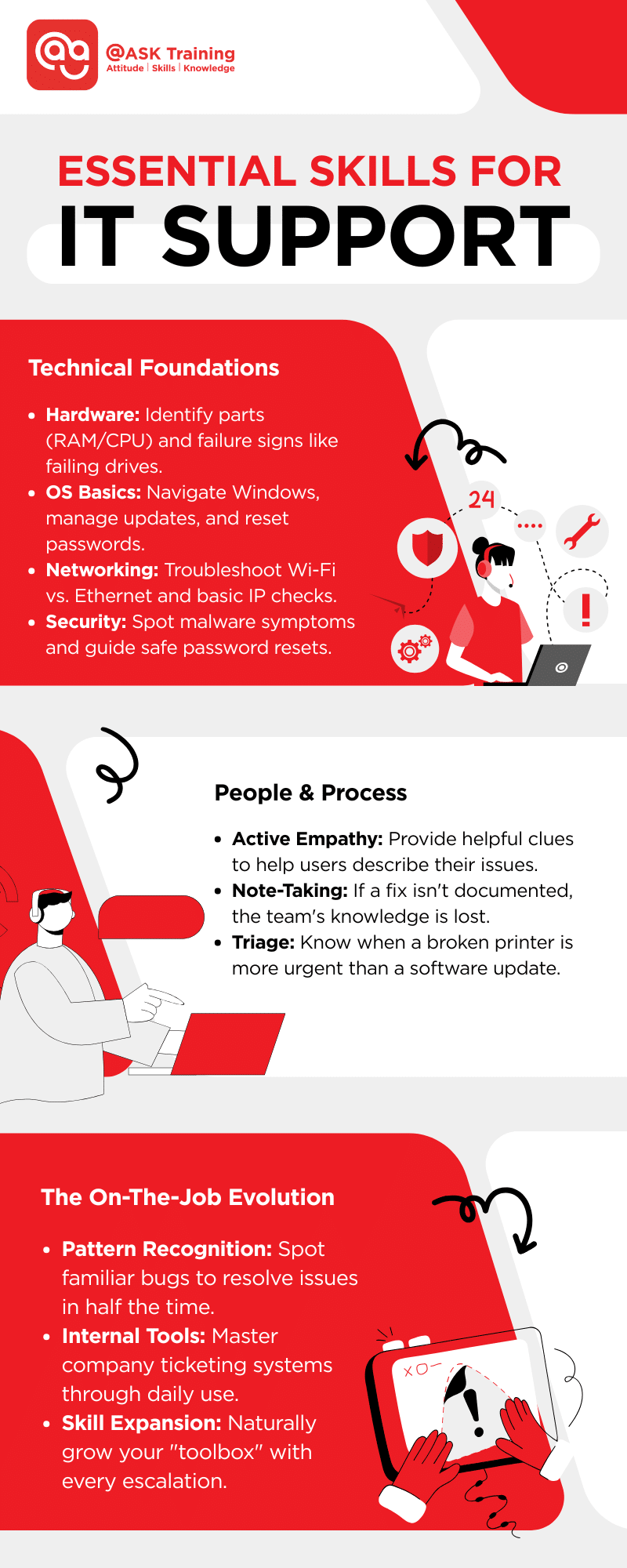
Most entry-level IT support roles expect you to learn many tools and systems after you start. With repeated exposure, you’ll also develop problem pattern recognition, spotting familiar issues and resolving them faster over time.
While having the right skills is essential, it is equally important to clear away the misconceptions that often prevent talented individuals from even applying.
What You Don’t Need to Start (Common Myths That Stop Beginners)
Many beginners hesitate to enter IT support because they assume they’re missing “essential” skills. In reality, most entry-level roles are designed for people learning on the job.
You don’t need to know how to code
- Entry-level IT support is not a programming role.
- While basic scripting can be useful later, your day-to-day work focuses on diagnosing issues, following troubleshooting steps, and applying known fixes.
- Most problems involve devices, settings, accounts, or connectivity, not writing software.
You don’t need a computer science degree
- Employers hiring junior IT support staff are typically more interested in practical ability than academic credentials.
- Many successful IT support professionals in Singapore come from non-technical backgrounds such as administration, customer service, or operations, where communication and problem-solving skills already translate directly.
What you do need instead
You need curiosity, patience, and the willingness to practise systematically. Entry-level IT support rewards people who ask good questions, document clearly, and improve with repetition.
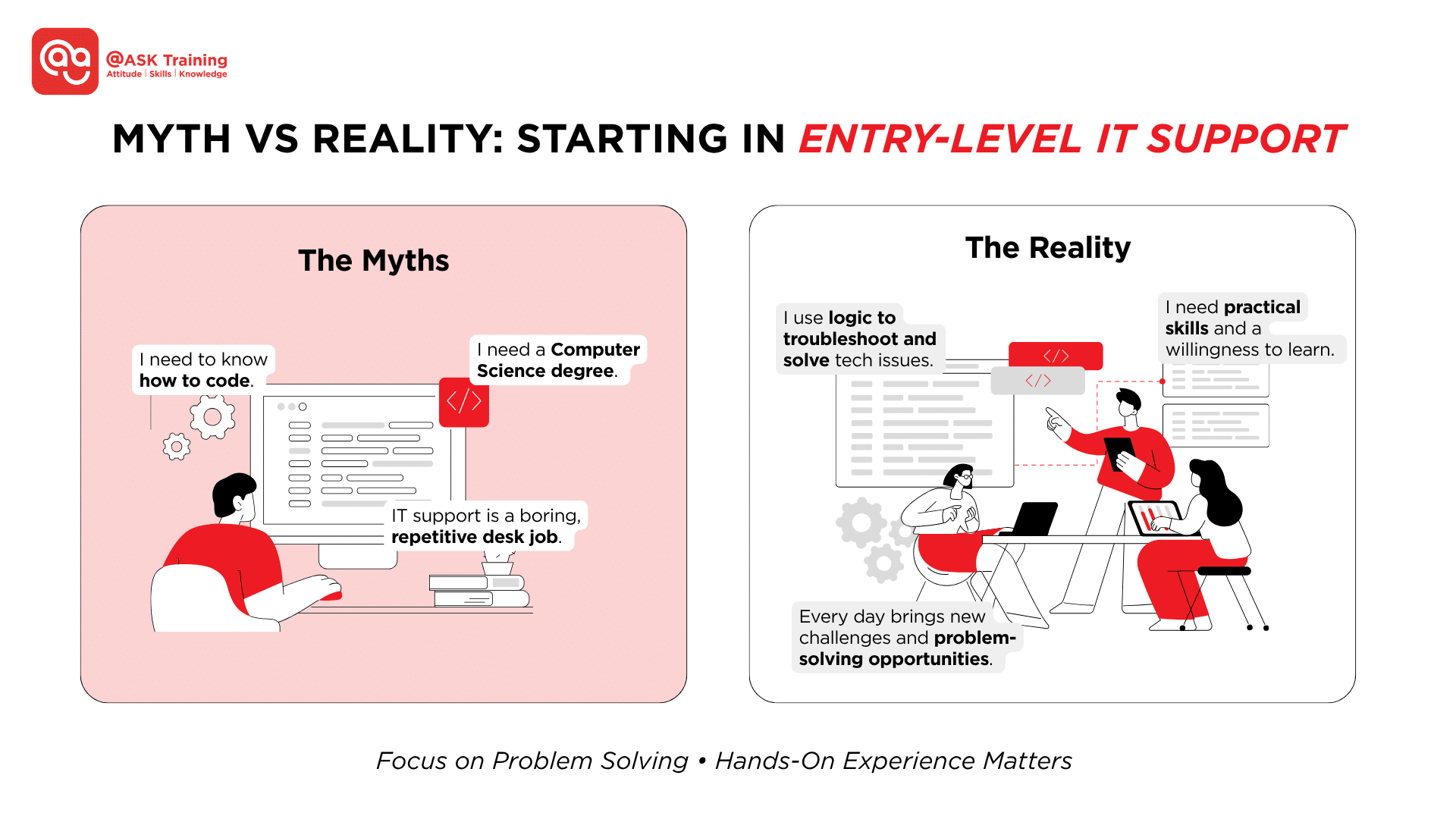
As illustrated above, many common assumptions about IT support don’t hold up in practice.
Now that we’ve covered the daily grind and the skills required, let’s look at the “Hard Parts” of the job and how to handle them like a pro.
The Hard Parts of IT Support (Realistic Expectations)
Being a “first responder” for tech issues is rewarding, but it isn’t without its challenges. Understanding the “pressure points” now will help you stay steady when things get busy.
DealingWith Frustrated Or Impatient Users
Not every user communicates clearly, and some may be stressed or upset. Handling these situations calmly is a core skill.
Example:
A colleague repeatedly reports “my email isn’t working” while under a tight deadline.
You need to calmly clarify the problem: is it a login issue, an Outlook error, or a network problem? Clear communication prevents escalation and builds trust.
BalancingMultiple Tickets Under Time Pressure (SLAs)
You may have several tickets to handle at once, and many organisations use service-level agreements (SLAs) to track and measure incident severity and the agreed response times to such incidents between IT support and users.
Example:
In a Singapore office, one ticket might involve a printer outage affecting 10 staff, while another is a single user reporting a slow PC.
The printer issue is prioritised to be resolved within 1 hour, while the slow PC may have a timeline of 4 hours – both still need timely updates in the ticketing system.
Singapore Mini Case Study: Busy Morning at a Local Office
At a medium-sized office in Orchard Road, a help desk technician starts their day with five new tickets:
- The office printer won’t print for a sales team preparing for a client presentation.
- A staff member cannot access the internal HR portal.
- A laptop freezes every few minutes during Zoom calls.
- An employee accidentally deleted shared files on the network.
- A Wi-Fi outage in one meeting room interrupts a training session.
The technician triages based on urgency: the printer and Wi-Fi affecting multiple people are addressed first, while single-user issues like the frozen laptop and file recovery are queued.
By following playbooks, checking system logs, and escalating network or file server issues promptly, all problems are resolved efficiently within the SLA, keeping the office running smoothly.
IT Support Ticket Workflow – At a Glance
- Issue Arrives → A new ticket is logged when a user reports a problem.
- Triage → Assess impact and urgency (e.g., printer outage affecting multiple staff takes priority over a single-user issue).
- Troubleshoot → Follow standard fixes and playbooks to resolve the issue.
- Escalate if Needed → Hand off the issue to senior IT staff or another team if it’s beyond your scope.
- Document → Record steps taken, resolution, and any escalations before closing the ticket.
Tip: This simple 1–5 process helps beginners stay organised, even during busy, high-pressure periods.
With the “hard parts” covered, we’ll move into the “IT Support Career Path” to see how these entry-level roles lead to high-level careers in Cybersecurity, Cloud, or Systems Administration.
Career Pathways After Entry-Level IT Support
Starting in entry-level IT support is just the first step towards a rewarding and fulfilling career in tech. These roles give you practical, hands-on experience and help you build strong technical fundamentals.
With this foundation, it becomes much easier to specialise later in areas such as system administration, networking, cybersecurity, or cloud technologies.
Understanding typical pathways helps you plan your next moves and identify which skills and certifications will accelerate your progression.
Help Desk → Desktop Support → System / Server Administration
This is the most traditional route. You move from remote troubleshooting to hands-on hardware management, eventually taking responsibility for the servers, storage, and backups that power the entire company.
What to learn next: Server management (Windows Server/Linux) and virtualisation.
Support → NetworkEngineerPathway
If you find yourself fascinated by how data moves, this path is for you. You’ll progress from fixing Wi-Fi drops to designing the architecture of complex corporate networks.
What to learn next: Routing, switching, and protocols. Certifications like CompTIA Network+ or Cisco CCNA can be useful here once you’re ready.
Support → CybersecuritySpecialist
Every IT support task has a security element. You can transition into a Security Operations Centre (SOC) Analyst role, monitoring for threats and defending the organisation against breaches.
What to learn next: Incident response and threat hunting. Certifications such as CompTIA Security+ or CEH are well-recognised in this path.
Support → Cloud / DevOps
As businesses move to the cloud, there is a high demand for professionals who can manage virtual environments.
You’ll evolve from managing local logins to building scalable, automated infrastructure in the cloud.
What to learn next: Certs like AWS Solutions Architect (Associate), Google Cloud Associate, or Microsoft Azure Fundamentals are common checkpoints.
Certifications as Accelerators
While not always mandatory for your first jobs, certifications like the ones below act as “career accelerators.”
- CompTIA A+ – serves as a baseline certification, signalling foundational IT support knowledge.
- Network+ or Security+ – chosen depending on your career direction.
- Completing these certifications alongside on-the-job experience accelerates progression and strengthens your CV.
While the long-term career prospects are vast, the journey begins with landing your very first role, a process that relies less on a perfect resume and more on your ability to prove you can solve real-world problems.
How to Get an IT Support Job With No Experience
Breaking into IT support without prior experience is entirely possible.
Entry-level roles are designed for on-the-job learning, so your focus should be on gaining hands-on experience, showing curiosity, and building a portfolio that demonstrates your skills.
Build a Troubleshooting Log
One of the best ways to show potential employers that you’re ready for IT support is to create a record of problems you’ve solved. This doesn’t have to be in a workplace; it can come from personal projects or volunteering.
Examples:
- Fixed a slow PC at home by clearing background processes, updating drivers, and checking disk space.
- Set up a Wi-Fi router for your household and resolve intermittent connectivity issues.
- Installed a printer, configured drivers, and solved paper jam or network printing issues.
For each issue, record:
- Problem: What was reported
- Steps taken: What you did to investigate
- Result: What worked and what didn’t
This log acts as a mini portfolio, showing recruiters that you can systematically solve problems.
Do Small Practical Projects
Hands-on practice is invaluable for building confidence and skills, and using your own laptop, desktop, or home network is sufficient to get started.
Examples of beginner-friendly projects:
- Practice performing clean installs of Windows or Linux. Use Virtual Machines (VMs) like VMware or VirtualBox to safely simulate different operating systems and configurations without affecting your primary computer.
- Update drivers, set up printers, and troubleshoot device issues.
- Configure a home network, including Wi-Fi, wired connections, and basic router settings.
- Run a malware scan and clean up infected files safely.
- Experiment with creating local user accounts and managing permissions.
These small projects mirror real entry-level IT support tasks and give you concrete experiences to discuss in interviews.
Tailor Your Resume to Entry-Level IT Roles
Even without work experience, your resume can highlight transferable skills and hands-on projects.
Use keywords that match job descriptions to pass through Applicant Tracking Systems (ATS), which many companies in Singapore use to screen applications automatically. ATS are automated tools used by employers to screen CVs before a human reviews them.
Examples:
- “Logged and resolved hardware and software issues using structured troubleshooting steps.”
- “Configured network devices and managed user access permissions.”
- “Documented troubleshooting steps and outcomes for future reference.”
Include your troubleshooting hardware and software log and small projects under a “Projects” or “Practical Experience” section.
Look for Beginner-Friendly Roles
Look for roles that commonly accept beginners or career switchers, such as:
- Help Desk / Service Desk
- Desktop Support
- IT Support Technician
- IT Support Specialist
In Singapore, many companies explicitly highlight on-the-job training or mentorship opportunities in job postings, making these positions accessible to beginners.
Volunteer or Freelance for Practice
Real-world exposure accelerates learning. If possible, volunteer to help small businesses, NGOs, or friends/family with IT issues. Even a few documented fixes can become part of your portfolio.
Examples:
- Set up laptops and printers for a local community centre.
- Help a small business configure its POS devices and Wi-Fi.
This builds skills and demonstrates initiative to potential employers.
A Practical Shortcut: Hands-On PC/Laptop Maintenance Skills
While building a home lab and self-studying are excellent starting points, many beginners find that the fastest way to gain true professional confidence is through structured, hands-on guidance.
If you are a tactile learner who prefers “doing” over just “reading,” specialised training is the most efficient bridge to your first IT role.
At @ASK Training, our 2-Day IT Clinics (PC and Laptop Maintenance) course is designed to eliminate the “no experience” barrier.
We position you for success by simulating a real-world IT environment where you can:
- Dismantle and Assemble: Move beyond diagrams by physically identifying parts like RAM, SSDs, and motherboards. Understanding how hardware connects to system symptoms is much easier when you’ve held the components in your hands.
- Align with Real-World Tasks: Our curriculum is mapped directly to entry-level requirements, including installing operating systems, configuring software, applying basic security precautions, and fixing common device issues.
Master the Issues Users Actually Raise
In a modern workplace, you’ll be expected to resolve a specific set of recurring problems.
Our IT Foundation and Network and IT Troubleshooting courses ensure you can walk into an interview, and your first day on the job, knowing how to handle:
- Connectivity: Troubleshooting “Wi-Fi connected but no internet” or failure to join the company network.
- System Performance: Diagnosing PC freezing, mysterious slowdowns, or “not responding” errors.
- Peripherals: Solving keyboard/mouse disconnects and the ever-present printer troubleshooting (stuck queues, offline status, and basic laser printer checks).
- Communication Tools: Fixing audio issues like “no sound” or microphones not working during critical Zoom or Teams calls.
- Storage Health: Recognising failing drive signs, such as unusual noises, read/write errors, or low disk space alerts.
By the end of this practical “shortcut,” your troubleshooting log won’t just be a list of home fixes; it will be a professional record of technical labs completed under expert supervision.
Wrapping Up
So, is IT support a good entry-level job? Absolutely. It’s practical, learnable, and opens multiple career directions as you continue to build your skills.
Expect a busy, people-facing environment, but by following repeatable troubleshooting processes, beginners can progress quickly.
Your Next Steps (Choose one path):
- Self-practice + projects: Build hands-on experience with PCs, laptops, and home networks, and maintain a troubleshooting log.
- Certification track: Complete recognised certifications to boost your CV and career progression. In Singapore, @ASK Training offers IT courses that are industry-aligned, providing both practical skills and credentials.
- Hands-on maintenance training: If you learn best by doing, attend a structured workshop to gain immediate confidence in dismantling hardware and diagnosing real-world software errors.
“The best way to learn IT is by fixing IT” – Anonymous Industry Saying
By involving yourself in the practical side of IT today, you aren’t just looking for a job; you’re building a career.
Related Courses
- IT Foundations Courses
- Certificate in Infocomm Technology – Infrastructure and Operations
- Advanced Certificate in Infocomm Technology (Infrastructure and Operations)
- Diploma in Infocomm Technology (Infrastructure and Operations)
◆◆◆
Related Articles
Article Topics
- What “Entry-Level IT Support” Actually Means
- Why IT Support Is Beginner-Friendly
- What You’ll Do Day-to-Day in an Entry-Level IT Support Job
- Skills You Need to Start (and What You Can Learn on the Job)
- What You Don’t Need to Start (Common Myths That Stop Beginners)
- The Hard Parts of IT Support (Realistic Expectations)
- Career Pathways After Entry-Level IT Support
- How to Get an IT Support Job With No Experience
- A Practical Shortcut: Hands-On PC/Laptop Maintenance Skills
- Wrapping Up