
Every day, operations teams lose hours to the same invisible drains: scattered information, repetitive data entry, slow approvals, and avoidable errors.
You feel it as a business owner or operations manager, that nagging sense that your team could be doing more if only the processes weren't working against them.
That’s where AI in operations changes the game.
We’re not talking about science fiction or replacing your people with robots. Instead, think of artificial intelligence in operations as a practical, approachable tool that helps your team work smarter. It handles the routine so your people can focus on problem-solving, customers, and growth.
Let’s explore how AI workflow automation can make your business faster, smoother, and far less prone to daily friction.
What Does AI in Operations Mean?
Simply put, AI in operations means using smart tools to help you organise work, automate repetitive tasks, spot patterns, and make better day-to-day decisions, without needing a computer science degree.
You’re probably already using basic versions of business process automation without realising it. But when you add AI, things get more proactive.
Common uses include:
- Smart scheduling
- Automated reporting
- Inventory tracking
- Task routing
- Document processing
- Customer support triage
Here’s a simple example: Instead of someone manually sorting every incoming customer request, AI automation tools can categorise each ticket, send it to the right person, and even suggest the next step.
The human still handles the conversation, but they waste zero time on sorting.
Why AI Matters in Workflow Efficiency
Operations teams juggle moving parts: people, deadlines, customer expectations, and endless handoffs. When one piece slips, everything slows down.
AI operational efficiency steps in by reducing delays and repeated work.
For instance, instead of someone re-entering data from a form into three different systems, AI pulls those details once and populates them everywhere.
Smoother handoffs become possible, too. Imagine a support call ending, and AI immediately summarises key points for the billing team or flags an urgent order for shipping. That’s workflow efficiency in action.
A quick word of honesty, though: AI won’t magically fix a broken process. If your approval chain already makes no sense, automating it will just make nonsense happen faster. Always fix the process first.
Reducing Repetitive Manual Work
If you ask any operations manager what drains their team’s energy, the answer is almost always the same: repetitive, low-judgment tasks.
One of the clearest benefits of AI process automation is taking those tasks off your team’s plate. Think about:
- Data entry
- Invoice sorting
- Drafting routine reports
- Appointment scheduling
- Document review
- Sending status updates
When AI handles these, your people get time back for real problem-solving and customer-facing work.
That said, always keep a human in the loop for accuracy. AI-generated work should be reviewed when details matter, especially with invoices, compliance documents, or customer communications.
Helping Teams Find Bottlenecks Faster
Here’s a frustrating reality: most teams don’t realise where their workflow slows down until something breaks completely.
AI for operations management changes that by helping you see the delays before they become crises.
AI can flag patterns like:
- Approvals that consistently take too long
- Repeated customer issues from the same step
- Overloaded team members
- Missed handoffs between departments
- Orders getting stuck in processing
Spotting these earlier means you can fix problems while they’re still small.
For example, if customer requests keep stalling at the same approval step every Tuesday afternoon, AI can flag that step as a workflow bottleneck.
You then investigate why, maybe someone is out of office, and adjust accordingly.
Next, how do we help our team make faster decisions once they know what to focus on?
Supporting Faster Day-to-Day Decisions
Have you ever watched a team member spend twenty minutes deciding which task to tackle first? That’s not laziness; it’s a lack of clear signals.
AI in business operations acts as a decision-support tool. It doesn’t make every choice for you, but it gives your team clearer information so they can act faster.
Examples include:
- Identifying which customer requests are truly urgent
- Predicting busy periods so you can prep ahead
- Highlighting low stock before you run out
- Showing which tasks need attention right now
Here’s a practical one: If demand rises every rainy weekend or during certain seasons, AI can help you plan staffing, inventory, or delivery schedules earlier, not after the chaos hits.
Faster decisions naturally lead to another critical area: how you allocate your people, time, and resources in the first place. Because even the fastest decision is wasted if your scheduling is a mess.
Making Scheduling and Resource Planning Easier
Few things hurt operational efficiency more than either idle staff or overwhelmed teams.
In Singapore, where commercial rents and labour costs don't wait for anyone, AI helps you balance both.
With the right AI automation tools, you can improve:
- Staff scheduling based on predicted demand
- Route planning for deliveries
- Workload balancing across team members
- Inventory planning to avoid overstock or shortages
- Maintenance timing before equipment fails
Consider a local delivery or logistics business as an example. Instead of drivers guessing the best route through Singapore’s expressways and narrow estate roads, AI can suggest more efficient paths, reduce unnecessary travel, and help complete more stops in less time. That’s better for costs, for customers, and for driver sanity.
Better planning also means less last-minute firefighting and fewer rushed errors.
Of course, even the best schedule falls apart if teams aren’t communicating effectively. That’s where AI can act as a bridge, not a replacement, but a smoother.
Improve Communication Across Teams
Operational delays rarely start with someone being lazy. They usually happen because two teams didn’t have the same information at the same time.
Sales doesn’t know what support was promised. Operations doesn’t know what finance approved.
AI workflow automation can bridge those gaps. AI helps by:
- Summarising updates so no one reads ten emails
- Organising incoming requests by department
- Reminding teams of next steps automatically
- Keeping records searchable and easy to find
Handoffs between sales, support, finance, and operations become much smoother.
For instance, when a sales rep closes a deal, AI can automatically notify the onboarding team and create a checklist, without anyone remembering to forward an email.
To be clear: AI isn’t replacing internal communication. It’s just removing the friction that slows it down.
When communication flows better, and schedules make sense, something remarkable happens: both your customers and your employees start having a better experience, without you having to dramatically change what you do.
Enhancing Customer and Employee Experiences
Smooth operations feel invisible to customers, but they feel the absence of friction. Faster responses, fewer errors, clearer updates, and reliable service all come from better backend processes.
When you apply artificial intelligence in operations, customers benefit from:
- Quicker answers to common questions
- Fewer “we’ll get back to you” delays
- Accurate order statuses without chasing
Your employees benefit just as much. Less repetitive work, fewer confusing manual processes, and less time spent asking “who handles this?” means they actually enjoy their day more.
In Singapore’s tight labour market, that kind of employee experience directly impacts retention.
That’s the real win: workflow efficiency isn’t just a metric. It’s the difference between a team that’s exhausted and a team that’s engaged.
All of this probably sounds promising, but you might be thinking: “That’s nice in theory, what does this actually look like for someone like me?”
Examples of AI in Operations
Let’s make this concrete. Here’s how real teams are using automation in operations every day, including scenarios that fit Singapore’s business environment:
- A support team uses AI to sort incoming tickets by urgency so critical issues never sit at the bottom of a pile.
- A warehouse uses AI to predict which items may run low before the end of the month.
- A delivery company uses AI to suggest more efficient routes, cutting fuel costs and delivery times.
- A finance team uses AI to organise invoices and flag missing details before approval.
- A manager uses AI summaries to review project updates faster instead of reading fifteen separate status reports.
- An F&B chain uses AI to predict ingredient demand across multiple outlets, reducing waste and preventing stockouts.
Each example ties back to time savings, fewer errors, or smoother workflows, not fancy technology for its own sake.
How Can AI Help Increase Conversions
Conversions don't happen by accident. They happen when the right message reaches the right person at the right time.
AI for conversions supports each part of that equation:
- Better timing: Contact interested leads sooner, before they go with a competitor.
- Better relevance: Show content that fits exactly where the customer is in their journey.
- Better follow-up: Reduce response delays and spot exactly where people drop off in your funnel.
That said, AI alone won't fix bad messaging or a weak offer. It works best when paired with a strong strategy, clear value, and human judgment. Think of it as support for the work you're already doing.
That all sounds promising in theory. But what does this actually look like in real businesses? Let's get concrete.
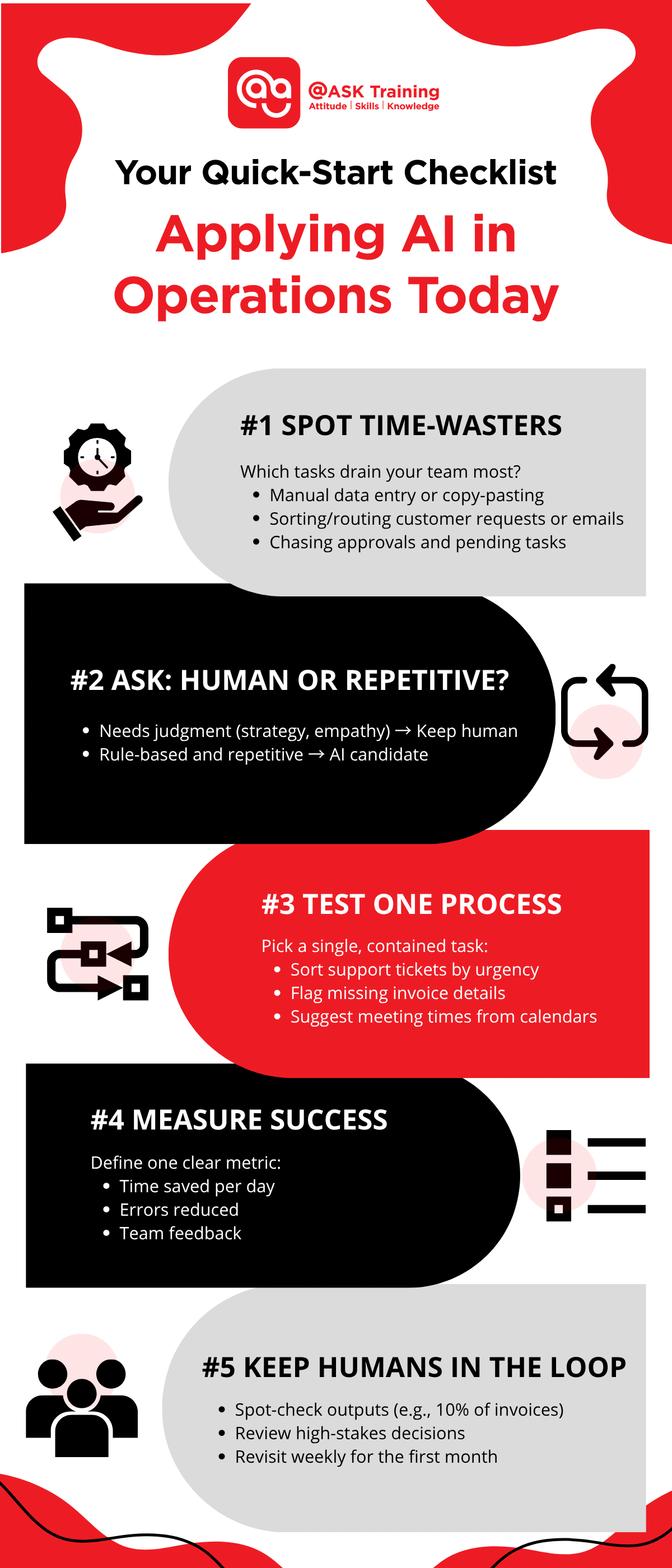
Your Quick-Start Checklist: Applying AI in Operations Today
You don't need a massive budget or a technical team to get started.
Here's a practical checklist to help you identify where AI workflow automation can deliver quick wins for your business.
Step 1: Spot Your Top Three Time-Wasters
Look at last week. Which tasks repeatedly ate up your team's time?
- Manual data entry or copy-pasting between systems
- Sorting and routing customer requests or emails
- Chasing approvals or following up on pending tasks
- Drafting routine reports, invoices, or status updates
- Scheduling meetings or appointments
Step 2: Ask "Does This Need a Human Brain?"
For each time-waster, decide if it requires judgment or just repetition.
- Requires human judgment (strategy, empathy, exceptions) → Keep it human
- Repetitive and rule-based → Good candidate for AI
Step 3: Pick One Small Process to Test
Don't overhaul everything. Choose a single, contained task.
- Sorting incoming support tickets by urgency
- Summarising long email threads for your team
- Flagging invoices that are missing key details
- Suggesting meeting times based on calendar availability
- Categorising form submissions or survey responses
Step 4: Set a Simple Success Measure
How will you know if it's working?
- Time saved per day (e.g., "two hours less data entry")
- Error reduction (e.g., "fewer misrouted customer requests")
- Faster turnaround (e.g., "approvals cut from one day to one hour")
- Team feedback (e.g., "my staff feels less frustrated")
Step 5: Keep a Human in the Loop
Decide when and how your team will review AI-generated work.
- Spot-check a percentage of outputs (e.g., 10% of invoices)
- Review all high-stakes decisions (e.g., refunds or escalations)
- Revisit the process weekly for the first month
Download this quick checklist to help you keep track:
Pro Tip: Start with Built-in Tools
Before buying new software, check what you already use.
Many common platforms (email clients, project management tools, CRM systems) now include basic AI automation tools that are turned off by default.
Turn one on, test it for a week, and see what happens. You might be surprised at how much workflow efficiency you gain from tools you already pay for.
By now, you might be excited to try this yourself, and you should be. But let’s pause for a moment of real talk. AI isn’t a magic wand.
There are real risks if you jump in without thinking, especially with Singapore’s strict data protection landscape under the PDPA.
The Risks of Overusing AI in Operations
We’d be doing you a disservice if we only talked about the upside. AI in operations comes with real risks when teams rely on it without oversight.
Watch out for:
- Inaccurate outputs (AI can be confidently wrong)
- Poor data leading to bad automation
- Confusing automation that creates more work
- Privacy concerns with customer or employee data (particularly relevant under Singapore's PDPA)
- Employees losing visibility into how decisions are made
Also critical: automating a bad process just makes the problem happen faster. If your return authorisation process is a mess, AI won’t fix it, it’ll just process messy returns at high speed.
Example: If an AI tool routes customer requests using outdated categories, important issues may go to the wrong team for days. That’s worse than no automation at all.
If risks exist, does that mean AI isn’t worth it? Not at all. It just means you need one critical ingredient that no algorithm can replace: human judgment.
Why Human Oversight Still Matters Most
Here’s our firm stance at @ASK Training: AI serves people, not the other way around.
Business process automation still requires judgment, context, flexibility, and accountability; all human strengths. AI can suggest priorities and automate routine steps, but people need to handle exceptions, sensitive decisions, and anything involving relationships.
Teams should always know where AI is being used and feel empowered to step in when something feels off.
In a regulated environment like Singapore’s, where customer data and compliance are non-negotiable, that human oversight isn’t optional; it’s essential.
The best approach? Let AI handle the routine work while your people manage quality, customer relationships, and strategic decisions. That’s not compromise, that’s smart operations.
So, where is all of this heading? Because AI isn’t standing still, and neither should your business.
The Future of AI in Operations
Looking ahead, AI for operations management will only become more embedded in everyday work.
Expect to see:
- More connected workflows across formerly separate systems
- Faster issue detection before customers even notice
- Smarter planning that adapts to real-time changes
- Even more routine tasks becoming automated
For Singapore businesses specifically, this means staying competitive without burning out your teams.
As the government continues pushing Smart Nation initiatives and digital transformation grants, AI adoption will move from "nice to have" to "table stakes" across industries.
The goal isn’t automation for its own sake. It’s businesses becoming more responsive and less weighed down by manual work.
AI in operations delivers real value when it improves the flow across your whole organisation, from the first customer touchpoint to the final delivery.
By now, you probably have a clear picture of what’s possible. Let’s bring this back to where you started: your business, your team, and the daily work that needs to get done.
Wrapping Up
You didn’t build your business to watch your team drown in repetitive tasks, slow approvals, and avoidable errors. AI in operations offers a practical way out.
From reducing manual work and improving accuracy to finding bottlenecks and making scheduling easier, AI helps create smoother, faster, and more reliable operations.
Just remember: AI works best when it supports your people and improves your existing processes, not when it replaces judgment.
Ready to stop fighting your workflows? Start small. Pick one repetitive task from the checklist above, explore AI workflow automation, and see what changes.
Your team (and your customers) will notice the difference!
Ready to Move from Theory to Practice?
Reading about AI is one thing. Applying it effectively to your actual daily operations is another. That’s where we come in.
At @ASK Training, we help Singapore business owners, operations managers, and teams move beyond the hype with practical, hands-on learning.
For Individuals & Teams
- Explore our Generative AI Courses: Learn how to use AI tools for real-world tasks like content drafting, data summarisation, and customer communication.
- Whether you're new to AI or looking to deepen your skills, our courses are designed for non-technical professionals.
For Organisations
- We offer customised corporate training programmes tailored to your industry, workflow, and business goals.
- Not sure where to start? We provide a Training Needs Analysis to help identify exactly which AI skills and processes will deliver the biggest impact for your organisation. Book your complimentary 15-minute consultation with us!
New Specialised Course
We developed a dedicated course on AI in Operations: Enhancing Workflow Efficiency & Automation, exactly what this article covers.
This newly launched course will walk you through:
- Identifying bottlenecks using AI
- Setting up simple AI workflow automation for repetitive tasks
- Choosing the right AI automation tools for your industry
- Maintaining human oversight and PDPA compliance
Register with us today! Your smoother, faster, more efficient operation is closer than you think.
Related Courses
- (24hrs) AI in Operations: Enhancing Workflow Efficiency & Automation
- Beyond ChatGPT: The Ultimate GenAI Toolkit for Workplace Productivity
◆◆◆
Related Articles
Article Topics
- What Does AI In Operations Mean?
- Why AI Matters in Workflow Efficiency
- Reducing Repetitive Manual Work
- Helping Teams Find Bottlenecks Faster
- Supporting Faster Day-to-Day Decisions
- Making Scheduling and Resource Planning Easier
- Improving Communication Across Teams
- Enhancing Customer and Employee Experiences
- Examples of AI in Operations
- Your Quick-Start Checklist
- The Risks of Overusing AI in Operations
- Why Human Oversight Still Matters Most
- The Future of AI in Operations
- Wrapping Up