
Professional Certificate in Business Analytics & Statistics with Excel
Develop practical business analytics skills and advance your Excel capabilities from fundamentals to expert techniques.


*Eligible for Singaporean Citizens, Permanent Residents, and Long-Term Visit Pass Plus Holders
*All of the modules in this Professional Certificate is UTAP claimable except for the Excel Mastery module
Why take Professional Certificate with @ASK Training?
Choosing the full Professional Certificate with @ASK Training means investing in a structured, industry-recognised learning journey that transforms you from an Excel user into a confident business analytics professional.
Have questions?
Our consultants are here to guide you. Get in touch today.
WSQ-Aligned & Industry-Recognised
Our curriculum is structured under the national WSQ Skills Framework, ensuring your skills in data and statistical analytics are relevant, standardised, and employer recognised.
Progressive Learning Pathway
Move seamlessly through four integrated modules, from Essentials to Mastery. Each course builds on the last, equipping you with a complete data analytics toolkit in Excel 365.
Learn by Doing, Not Just Watching
Every module is built around hands-on, business-focused case studies and exercises. You’ll apply your data analytics skills to real-world data scenarios, so you’re ready to deliver from day one in your role.
SSG Funding Support
As an SSG-approved training provider, we enable you to access up to 70% SkillsFuture subsidies, making high-quality, career-advancing training accessible and affordable.
Our Clients



Thank You For Downloading The Professional Certificate in Business Analytics & Statistics with Excel Brochure
Have Any Questions?
Submit the form below and our programme consultants will get back to you shortly.
"*" indicates required fields
Course Schedules
Need help? Contact us for more info
Professional Certificate in Business Analytics & Statistics with Excel
Module 1: WSQ Microsoft Excel Essentials
Learning Outcomes
At the end of the module, you should be able to:
-
Identify the various types of business statistics, including descriptive statistics in Excel workbooks
-
Create and edit imported data from external sources in Excel
-
Create formulas and functions to calculate business statistics
-
Edit worksheet data and cells
-
Format cells and worksheets in Excel, and utilise conditional formatting to emphasise key data
-
Manage multiple worksheets and windows
-
Prepare and format worksheets for printing
-
Sort and filter data range
-
Create charts using existing data
Learning Units
1. Introduction to Business Statistics & Application Fundamentals
- Types of Business Statistics
- Descriptive Statistics
- Excel Interface
- Giving Commands
- Using Command Shortcuts
- Creating a New Workbook
- Opening a Workbook
- Saving a Workbook
- Closing a Workbook
- Using Help
- Exiting Excel
2. Getting Started with Worksheets
- Navigating a Worksheet
- Entering Labels and Values
- Editing Cell Contents
- Selecting Cells and Ranges
- Entering Data in a Selected Range
- Entering Content Automatically
- Importing Data from a Text File and an Access Database
- Importing Data from the Web
3. Introduction to Formulas & Functions
- Overview of Formulas and Cell References
- Entering Formulas
- Absolute and Relative References
- Formulas with Multiple Operators
- Using Essential Statistical Functions
- Referencing External Data
4. Editing a Worksheet
- Copying and Moving Cells
- Controlling How Cells Are Pasted
- Checking Spelling
- Insert Cells, Rows, and Columns
- Delete Cells, Rows, and Columns
- Using Undo and Redo
- Finding and Replacing Content
- Notes
5. Formatting a Worksheet
- Formatting Text
- Formatting Values
- Adjusting Column Width and Row Height
- Working with Cell Alignment
- Adding Cell Borders and Background Colours
- Copying Formatting
- Applying and Removing Cell Styles
- Using Document Themes
- Applying Conditional Formatting
6. Managing Workbooks
- Using Workbook Views
- Selecting and Switching Between Worksheets
- Inserting, Renaming and Deleting Worksheets
- Moving and Copying Worksheets
- Changing Worksheet Tab Colour
- Splitting and Freezing a Window
- Working with Multiple Workbook Windows
- Hiding and Unhiding Rows, Columns and Worksheets
7. Managing Page Setup & Printing
- Previewing and Printing a Worksheet
- Setting the Print Area
- Adjusting Page Margins and Orientation
- Adjusting Paper Size and Print Scale
- Adding Print Titles, Gridlines and Headings
- Creating Headers and Footers
- Printing a Selection, Multiple Worksheets and Workbooks
8. Working with Data Ranges
- Sorting by One Column
- Sorting by Multiple Columns
- Filtering Data
9. Introduction to Charts
- Choosing and Selecting the Source Data
- Choosing the Right Chart
- Inserting, Moving, Resizing and Deleting Charts
- Changing Chart Layout and Styles
- Changing Chart Type
- Working with Chart Labels
Assessment
- Written Examination: 20 minutes
- Practical Assessment: 40 minutes
Module 2: WSQ Microsoft Excel Intermediate
Learning Outcomes
At the end of the module, you should be able to::
- Use Excel for statistical analysis by organising cell ranges, managing formula errors, applying conditional logic, and employing lookup functions for data search and matching.
- Manage large Excel data sets, including multiple worksheets and workbooks, and application of protection measures for the interpretation of the categorised data.
- Organise data in Excel by sorting, filtering, and separating the contents into multiple sets to effectively interpret the collected data for categorisation of meaningful identified data.
- Use features in Excel to create tables, including managing data sets and removing duplicate records.
- Optimise Excel functionalities for process improvement in business statistics by creating and formatting charts, including displaying data through histograms.
Learning Units
1. Formulas & Functions
- Cell and Range Names
- Displaying and Tracing Formulas
- Understanding Formula Errors
- Using Logical Functions
- Using Conditional Count, Sum and Average Functions
- Using Lookup Functions
- Using Database Functions
2. Managing Workbooks & Protection
- Splitting and Freezing a Window
- Working with Multiple Workbook Windows
- Protecting Workbooks
- Protecting Workbook Structure
- Protecting Worksheets and Worksheet Elements
3. Working with Data Ranges
- Creating Custom AutoFill List
- Sorting by Colours or Icons
- Sorting by Custom List
- Filtering Data
- Creating Custom AutoFilter
- Using Advanced Filter
- Using Text to Columns
4. Working with Tables
- Creating a Table
- Adding and Removing Data
- Working with the Total Row
- Sorting a Table
- Filtering a Table
- Removing Duplicate Rows of Data
- Slicers
- Formatting the Table
- Summarizing a Table with a PivotTable
- Converting to a Range
5. Working with Charts
- Using Quick Analysis
- Elements of a Chart
- Filtering Chart
- Working with Chart Labels
- Changing the Chart Gridlines
- Changing the Scale
- Emphasizing Data
- Using Chart Templates
- Using Sparklines
- Creating Histogram
Assessment
- Written Examination: 20 minutes
- Practical Assessment: 40 minutes
Module 3: WSQ Microsoft Excel Advanced
Learning Outcomes
At the end of the module, you should be able to:
- Use a series of business statistical formulas and functions for summarising and analysing categorical or numerical data sets, including utilising nested conditions, lookup, text, date, and time functions.
- Harness the skills needed to use Excel’s built-in data analysis tools to analyse data sets and identify trends and patterns.
- Distinguish between Excel’s built-in statistical functions and tools to conduct statistical analyses, taking into account the needs and objectives of stakeholders.
- Utilise PivotTable to understand and analyse the core data structures that include summarising datasets for the presentation of actionable business insights to stakeholders.
- Adopt relevant statistical software techniques to perform data queries across multiple sources to extract pertinent data for stakeholders.
- Apply macro recording functionality to aid automation of working with data sets and performing repetitive tasks.
Learning Units
1. Advanced Formulas and Functions
- Using Nested Logical Functions
- Using Conditional Summary Functions
- Analysing Data Set using Statistical Functions
- Performing Advanced Lookups
- Using Text Functions
- Using Date and Time Functions
2. Managing and Analysing Data Ranges
- Using Flash Fill
- Using Data Validation
- Generating Descriptive Statistics
- Using Histogram Analysis Tool
- Performing Regression Analysis
3. Organising and Summarising Data
- Working with Data Tables
- Working with Scenarios
- Creating a Scenario Summary Report
- Using Goal Seek
- Grouping and Outlining Data
- Using Subtotal
- Consolidating Data by Position or Category
- Consolidating Data Using Formulas
- Sharing Workbooks
- Tracking Changes
4. Working with PivotTables
- Creating a PivotTable
- Specifying PivotTable Data
- Using Multiple PivotTable Fields
- Changing a PivotTable’s Calculation
- Filtering and Sorting a PivotTable
- Working with PivotTable Layout
- Grouping PivotTable Items
- Updating a Pivot Table
- Formatting a PivotTable
- Creating a PivotChart
- Using Slicers
- Sharing Slicers Between PivotTables
5. Working with Web and External Data
- Inserting a Hyperlink
- Importing Data from a Text File and an Access Database
- Importing Data from Web
- Working with Existing Data Connections
6. Working with Macros
- Recording a Macro
- Playing and Deleting a Macro
- Adding a Macro to the Quick Access Toolbar
Assessment
- Written Examination: 20 minutes
- Practical Assessment: 40 minutes
Module 4: WSQ Microsoft Excel Mastery
Learning Outcomes
At the end of the module, you should be able to:
- Distinguish essential probability computations, distributions, and hypothesis testing logic for statistical analysis.
- Analyse relationships and trends in data using advanced statistical functions such as quartiles, correlations, and value deviation.
- Apply statistical tools including ANOVA, moving averages, rank/percentile, and sampling to extract insights from large data sets.
- Create integrated PivotTable reports using data models, built-in and custom-calculated fields, and report drill-downs.
- Evaluate and use array and summary functions (e.g. SORT, UNIQUE, XLOOKUP, AGGREGATE) to optimise complex data layouts and summarise insights dynamically.
- Interpret statistical results to support strategic decisions and facilitate advanced analytics discussions in a business context.
Learning Units
Probability and Statistics
Starting with the fundamentals of probability and statistics provides a solid foundation for understanding data analysis. It includes the basics of probability, how to calculate probability, and the concepts of probability distribution, which are crucial for analysing data variability and making predictions. This knowledge is essential for effectively utilising advanced statistical functions and tools in Learning Units 2 and 3.
Advanced Statistical Functions
Building on the foundational knowledge, this unit focuses on using advanced statistical functions to identify value deviation, determine the degree of variation, compute quartiles, and analyse correlations between variables. Additionally, learners will learn to identify ranked high and low values, enhancing their ability to perform sophisticated data analysis in Excel.
Advanced Statistical Tools
This unit provides practical learning to learners to perform natural language queries on data for intuitive analysis, conduct ANOVA (Analysis of Variance) to compare datasets, and calculate moving averages to identify trends. It also covers rank and percentile calculations to determine data positions and sampling techniques for accurate data representation.
Managing PivotTable Reports
This unit dives deeper into leveraging PivotTables for robust data analysis and reporting. The learners will learn to create integrated reports using data models, generate multiple reports from a single dataset, and drill down into details for deeper insights. It also covers applying built-in analysis calculations and working with custom-calculated fields to tailor reports to specific needs.
Array and Summary Functions
Leveraging the knowledge acquired from previous learning units, the learners will learn array functions and spill ranges, change data layouts using TRANSPOSE, and sort data dynamically with SORT and SORTBY. They will also learn to extract unique values with UNIQUE, perform data lookups using XMATCH and XLOOKUP, and compute summary values with AGGREGATE and SUMPRODUCT.
Enrolment Requirements
To apply for the Professional Certificate in Business Analytics & Statistics with Excel Programme, you will need to meet the following requirements:
- Age: 18 years old
- Language: At least D7 in GCE O-Level English or equivalent
- Minimum of GCE ‘O’ or equivalent; or
- NITEC/Higher NITEC, or
- Other qualifications considered on a case-by-case basis
Why Take @ASK Training’s Professional Certificate
When you learn with us, you will get certified by a recognised certification body, the Singapore Workforce Skills Qualifications (WSQ). You will also acquire extensive knowledge from highly experienced industry practitioners who develop and deliver top quality course content through experiential hands-on learning methodologies. What you can expect:
Industry-recognised WSQ Statement of Attainments for each module
Real-world hands-on exercises build around real-world business scenarios
Comprehensive, up-to-date curriculum and courseware
Professional Certificate in Business Analytics & Statistics with Excel Course Fees and Subsidies
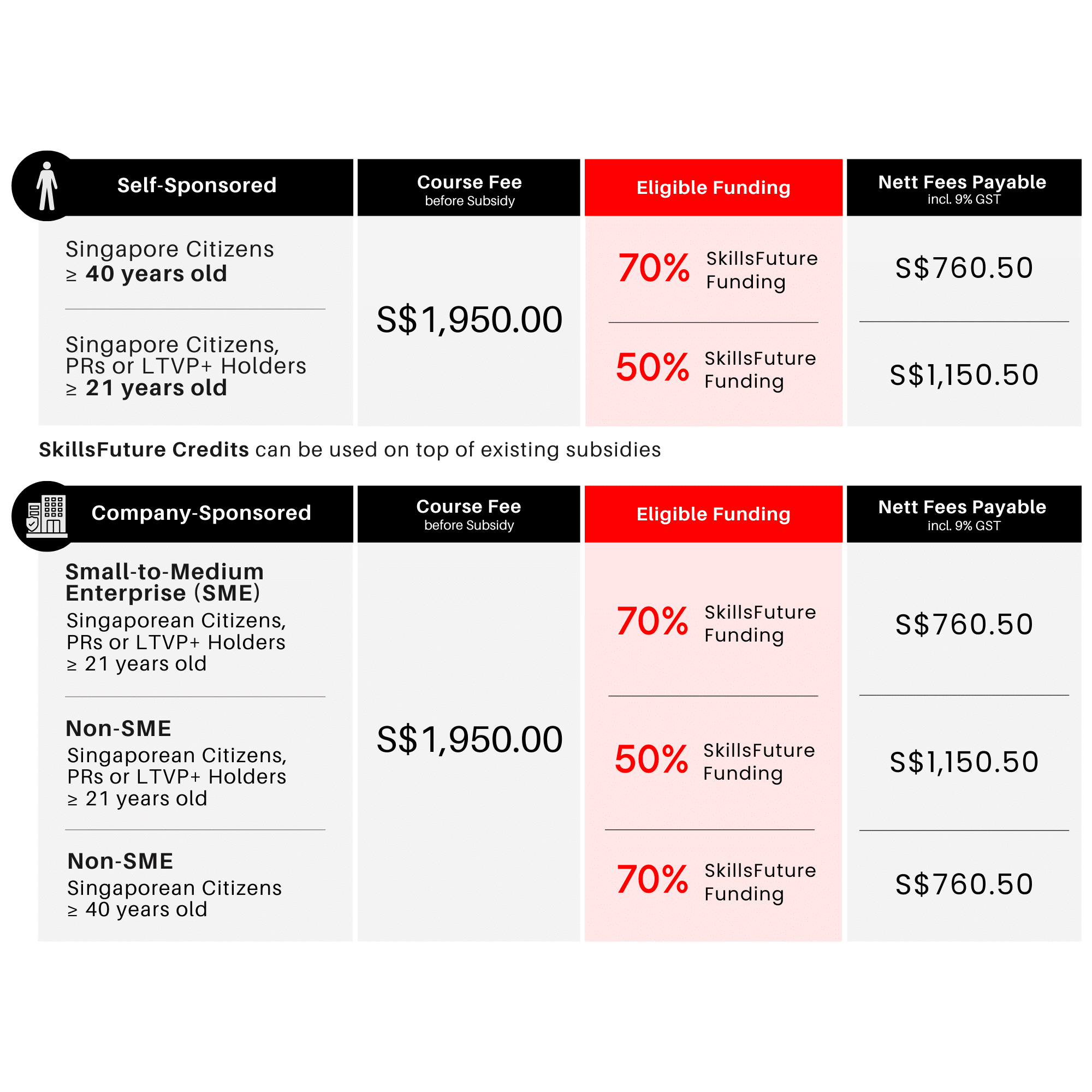
Criteria and/or Requirements for Course Subsidies
Baseline Funding Criteria and/or Requirements
Trainee is 21 years old and above, and a
- Singaporean Citizen; or
- Permanent Resident; or
- Long Term Visitor Pass Plus (LTVP+) Holder
Will be eligible for 50% SkillsFuture Funding.
Nett course fee payable (including 9% GST): S$1,150.50
Course fees can be further offset by SkillsFuture Credit for Singapore Citizens aged 25 and above. Singapore Citizens aged 21 to 31 may also offset fees with the Post Secondary Education Account Funds.
Mid-Career Enhanced Subsidy (MCES) Criteria and/or Requirements
Trainee is 40 years old and above, and a Singaporean Citizen, will be eligible for 70% SkillsFuture Funding.
Nett course fee payable (including 9% GST): S$760.50
Course fees after subsidies can be further offset by SkillsFuture Credit.
Company-Sponsored (SMEs)
Enhanced Training Support for SMEs (ETSS) – 70% Funding
Eligible for SME Company-Sponsored, 21 years old and above, and a
- Singapore Citizen; or
- Permanent Resident; or
- Long-Term Visitor Pass Plus (LTVP+) Holder
Nett course fee payable (including 9% GST): S$760.50
Course fees after subsidies can be further offset by Skillsfuture Enterprise Credit (SFEC)
Company-Sponsored (Non-SMEs)
SkillsFuture Baseline Funding – 50% Funding
Eligible Non-SME Company-Sponsored, 21 years old and above, and a
- Singaporean Citizen; or
- Permanent Resident; or
- Long Term Visitor Pass Plus (LTVP+) Holder
Nett course fee payable (including 9% GST): S$1,150.50
Course fees after subsidies can be further offset by Skillsfuture Enterprise Credit (SFEC)
SkillsFuture Mid-Career Enhanced Subsidy (MCES) – 70% Funding
Eligible for Non-SME Company-Sponsored, Singapore Citizens, aged 40 years old and above
Nett course fee payable (including 9% GST): S$760.50
Course fees after subsidies can be further offset by Skillsfuture Enterprise Credit (SFEC)
NOTE: Trainees are entitled to the SSG training grant when they meet 75% of the training attendance and pass the requisite assessment. If trainees fail the assessment, they are required to re-take it immediately without additional fee. For more details see Course Funding Information.
All Modules are PSEA and UTAP claimable except for Module 4 (Only PSEA claimable).
Important Reminder: Your PSEA claim needs to be submitted at least 1 month before the course’s commencement date. Should you miss this deadline, an alternative payment method must be used to secure your spot in the course. After the disbursement of your PSEA funds to us, we will reach out to initiate the refund process.
Professional Certificate in Business Analytics & Statistics with Excel Course Schedules
Modules must be completed in the required progressive sequence (Essentials, Intermediate, Advanced, Mastery). You may select your preferred dates, but the order of learning is fixed.
Module 1: WSQ Microsoft Excel Essentials
| Course Name | Duration | Month | Date | Venue | Remarks |
|---|---|---|---|---|---|
| WSQ Microsoft Excel Essentials TGS-2023041089 | 2 Days (9:00am - 6:00pm) | February 2026 | 28Feb-01 Mar | International Plaza | Weekends |
| March 2026 | 02-03 | International Plaza | Weekdays | ||
| 16-17 | JTC Summit | Weekdays | |||
| April 2026 | 01-02 | International Plaza | Weekdays | ||
| 04-05 | International Plaza | Weekends | |||
| 09-10 | JTC Summit | Weekdays | |||
| 13-14 | International Plaza | Weekdays | |||
| May 2026 | 04-05 | International Plaza | Weekdays | ||
| 07-08 | JTC Summit | Weekdays | |||
| 9-10 | International Plaza | Weekends | |||
| 14-15 | International Plaza | Weekdays | |||
| June 2026 | 04-05 | International Plaza | Weekdays | ||
| 06-07 | International Plaza | Weekends | |||
| 11-12 | JTC Summit | Weekdays | |||
| 15-16 | International Plaza | Weekdays |
Module 2: WSQ Microsoft Excel Intermediate
| Course Name | Duration | Month | Date | Venue | Remarks |
|---|---|---|---|---|---|
| WSQ Microsoft Excel Intermediate TGS-2024042612 | 2 Days (9:00am - 6:00pm) | February 2026 | 26-27 | International Plaza | Weekdays |
| March 2026 | 04&11 | International Plaza | Weekdays | ||
| 07-08 | International Plaza | Weekends | |||
| 09-10 | International Plaza | Weekdays | |||
| 19-20 | International Plaza | Weekdays | |||
| 23-24 | JTC Summit | Weekdays | |||
| April 2026 | 06-07 | International Plaza | Weekdays | ||
| 11-12 | International Plaza | Weekends | |||
| 16-17 | JTC Summit | Weekdays | |||
| 20-21 | International Plaza | Weekdays | |||
| May 2026 | 07-08 | International Plaza | Weekdays | ||
| 14-15 | JTC Summit | Weekdays | |||
| 16-17 | International Plaza | Weekends | |||
| 21-22 | International Plaza | Weekdays | |||
| June 2026 | 11-12 | International Plaza | Weekdays | ||
| 13-14 | International Plaza | Weekends | |||
| 18-19 | JTC Summit | Weekdays | |||
| 22-23 | International Plaza | Weekdays |
Module 3: WSQ Microsoft Excel Advanced
| Course Name | Duration | Month | Date | Venue | Remarks |
|---|---|---|---|---|---|
| WSQ Microsoft Excel Advanced TGS-2024045082 | 2 Days (9:00am - 6:00pm) | March 2026 | 14-15 | International Plaza | Weekends |
| 16-17 | International Plaza | Weekdays | |||
| 18&25 | International Plaza | Weekdays | |||
| 30-31 | JTC Summit | Weekdays | |||
| April 2026 | 09-10 | International Plaza | Weekdays | ||
| 18-19 | International Plaza | Weekends | |||
| 23-24 | JTC Summit | Weekdays | |||
| 27-28 | International Plaza | Weekdays | |||
| May 2026 | 11-12 | International Plaza | Weekdays | ||
| 21-22 | JTC Summit | Weekdays | |||
| 23-24 | International Plaza | Weekends | |||
| 28-29 | International Plaza | Weekdays | |||
| June 2026 | 18-19 | International Plaza | Weekdays | ||
| 20-21 | International Plaza | Weekends | |||
| 25-26 | JTC Summit | Weekdays | |||
| 29-30 | International Plaza | Weekdays |
Module 4: WSQ Microsoft Excel Mastery
| Course Name | Duration | Month | Date | Venue | Remarks |
|---|---|---|---|---|---|
| WSQ Microsoft Excel Mastery TGS-2025054065 | 2 Days (9:00am - 6:00pm) | February 2026 | 26-27 | JTC Summit | Weekdays |
| March 2026 | 19-20 | International Plaza | Weekdays | ||
| 28-29 | JTC Summit | Weekends | |||
| April 2026 | 13-14 | JTC Summit | Weekdays | ||
| 18-19 | International Plaza | Weekends | |||
| May 2026 | 14-15 | International Plaza | Weekdays | ||
| 23-24 | JTC Summit | Weekends | |||
| June 2026 | 11-12 | JTC Summit | Weekdays | ||
| 27-28 | International Plaza | Weekends |
Please note: Modules must be taken in progressive order—Essentials → Intermediate → Advanced → Mastery. Learners may choose their preferred dates, but the sequence must be followed.
Frequently Asked Questions (FAQ)
Is this programme just about Excel, or does it cover analytics too?
What will I learn in this professional certificate programme?
You’ll start with Excel basics and move to advanced data analytics topics:
- Formulas, charts, PivotTables
- Macros and automation
- Business statistics methods like regression & forecasting
- Hands-on business case studies
Do I need a background in statistics to join?
Is financial support available?
Yes. Eligible participants can receive up to 70% subsidy from SkillsFuture Singapore (SSG). Refer to the course fees and subsidies section above.
Will I receive a certificate?
Yes. You will receive a WSQ Statement of Attainment (SOA) for each module you complete. After completing all four modules, you will be awarded the Professional Certificate in Business Analytics & Statistics with Excel.
Speak to A Programme Consultant
Have questions? Speak to our programme consultants!
"*" indicates required fields